.png.022b5452a8f28f552bc9430097a16da2.png)
Leaderboard




Popular Content
Showing content with the highest reputation since 01/01/2026 in Posts
-
Le répertoire /classes était totalement corrompu. Le problème est désormais résolu.2 points
-
Im Kontaktformularmodul unter modules\contactform\contactform.php finden sich die erlaubten Dateiendungen in der Funktion sendMessage. Wenn das upgradesicher erweitert werden soll, musst du ein Modul-Override erstellen (https://devdocs.prestashop-project.org/9/modules/concepts/overrides/#override-a-module) public function sendMessage() { $extension = ['.txt', '.rtf', '.doc', '.docx', '.pdf', '.zip', '.png', '.jpeg', '.gif', '.jpg', '.webp'];2 points
-
https://prestaheroes.com/blogs/prestashop-alerts/prestashop-s-ownership-change-exposed-a-deeper-problem-why-shopify-ate-its-liver2 points
-
La sortie de PrestaShop 9 a malheureusement été un désastre en termes de gestion de version. La version 9.0.0 a été présentée comme la version « actuelle » à télécharger, ce qui a donné aux nouveaux administrateurs — ainsi qu’aux marchands existants — l’impression qu’il était sûr d’installer ou de mettre à jour, alors que ce n’était clairement pas le cas. S’appuyer sur la communauté pour tester une version majeure sur des boutiques en production est un très mauvais modèle, et de nombreux marchands en ont subi les conséquences. Espérons qu’avec la nouvelle direction de PrestaShop, cette mauvaise pratique cessera et que les futures versions majeures ne seront plus mises en avant comme étant prêtes pour la production avant de l’être réellement. Ce n’est qu’avec la version bêta de PrestaShop 9.1 que PrestaShop a clairement indiqué qu’elle n’est pas destinée aux administrateurs “classiques” et non techniques, ni à une mise à jour de boutiques en production. Tant qu’une version 9.x réellement stable n’existe pas, PrestaShop 9 doit être évité en production, en particulier par les utilisateurs non techniques.2 points
-
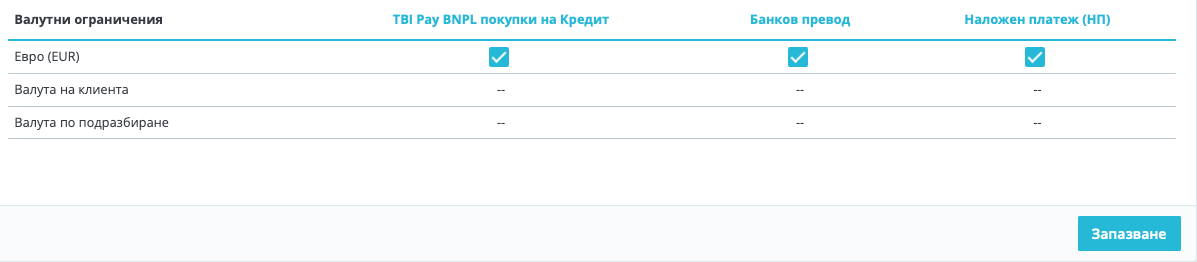
Hi, I have managed to change the currency successfully following these steps: 1. Add EUR as a new currency. 2. Set the correct conversion rate between BGN and EUR. PrestaShop will calculate prices automatically based on that rate. (optional, even if you don't do it when switch off BGN, the prices will remain the same w/out change ) 3. Set EUR as the default shop currency. 4.Disable BGN. You will see that after these steps, the prices will remain the same as they were, but in the new currency EUR. 5. Than you need to execute the following SQL queries: -- Convert base product prices from BGN to EUR UPDATE ps_product SET price = ROUND(price / 1.95583, 2), wholesale_price = ROUND(wholesale_price / 1.95583, 2); Convert shop-scoped prices (used even in single-shop installs) UPDATE ps_product_shop SET price = ROUND(price / 1.95583, 2), wholesale_price = ROUND(wholesale_price / 1.95583, 2); Now, everything should be ok. I realized that you need also to make two additional steps: 6. Change the prices of the transport! 7. Payment methods -> Settings: These were unchecked and I had to check them, because the currency was changed.
 2 points
 -
In PrestaShop 9, the order status email preview does not use your theme’s custom email templates. The preview pulls emails from the core fallback location, not from overridden theme folders. This is expected behavior and does not reflect what customers actually receive. Actual emails sent to customers will still use the correct theme and language templates. The preview tool is mainly for basic testing, not full template validation.2 points
-
Hi, In PrestaShop 9 the “Order status” email preview isn’t driven only by the old /mails/en/*.html files anymore. It uses the Twig email theme system, so it’s normal that footer.twig changes show up (Twig layout), while the main body still looks generic if you’re editing the wrong layer. What to do: BO → Design > Email theme: select your email theme and click Generate. Edit the Twig templates in /mails/themes/classic/ (templates/layouts/components), not just the language folder. Clear cache. And yes, preview breaking when /mails/themes/classic is missing looks like a fallback/bug, keep that folder.2 points
-
Hallo, Wenn Ihr Shop im Debug-Modus läuft, aber nicht im normalen Modul, müssen Sie in den meisten Fällen lediglich den Cache manuell leeren: https://www.mediacom87.fr/en/faq-how-to-clear-the-cache-manually-on-prestashop-17/2 points
-
oui n'importe quoi ou effectivement vous pouvez la supprimer si la commande n'existe plus en bdd. (sinon le module détectera le transporteur MR et voudra la réassocier)1 point
-
Vous pouvez virer les 3
1 point
-
It's been a long time since I've posted, but I've come up with a helpful tip while helping a friend develop a PrestaShop 9 website. I came up with a free way to embed responsive videos in product descriptions and any other HTML fields on the website. Enable the "Allow iframes on HTML fields" option (if it's disabled) on the "Shop Parameters > General" tab in the Back Office. Create a child theme (if you haven't already) to enable custom CSS to be added. Add the following to the themes/child_theme/assets/css/custom.css (this code makes the YouTube video responsive so it looks good on desktop, tablet and mobile): .embed-container { position: relative; padding-bottom: 56.25%; height: 0; overflow: hidden; max-width: 100%; margin-bottom: 1rem; } .embed-container iframe { position: absolute; top: 0; left: 0; width: 100%; height: 100%; } Upload the video to YouTube and choose either "Public" or "Unlisted" depending on whether you want the video searchable on your channel. Click the "Share" button on the video and then choose "Embed". Copy the <iframe> code to the product description or other HTML field in the Back Office and then add <p class="embed-container"> before the <iframe> code and </p> after the </iframe> code. I hope this helps someone.1 point
-
Hey, if you can attach the module here I can update it to work. Also make sure to include your prestashop version. I would need to know payment received order stat id. or from phpmyadmin or ps sql manager First, get the order_state ID(s) SELECT id_order_state, name FROM ps_order_state_lang WHERE name LIKE '%Payment%' OR name LIKE '%Received%'; Use those IDs in this report query This returns product + total qty for orders whose current status is “Payment Received”, within a date range: SELECT od.product_id, od.product_reference, od.product_name, SUM(od.product_quantity) AS qty_sold FROM ps_orders o JOIN ps_order_detail od ON od.id_order = o.id_order WHERE o.current_state IN (/* put id_order_state(s) here */) AND o.date_add >= '2026-01-01 00:00:00' AND o.date_add <= '2026-01-31 23:59:59' GROUP BY od.product_id, od.product_reference, od.product_name ORDER BY qty_sold DESC;1 point
-
Hello PrestaShop community, I'm releasing a profesionnal dedicated penetration testing tool i used since years for PrestaShop 1.7.x ( and on a couple of days 8.x ) – designed for integrators, freelancers, hosting providers, and security teams who need to go beyond basic automated scanners. The goal: Simulate a real attacker on your PrestaShop instance (legally, with proper authorization) and generate a professional PDF report that developers, sysadmins, and CISOs can actually use. 🎯 What the tool does Core capabilities: Identifies critical vulnerabilities (SQLi, RCE, XXE, SSRF, etc.) specific to PrestaShop installations Audits system configuration (file permissions, backdoors, Lynis integration) Maps known CVEs through a dedicated, editable JSON database Generates 15-30 page PDF reports with CVSS scores, proof-of-concept evidence, and prioritized remediation Not a replacement for full manual pentesting – think of it as a productivity booster to quickly identify the most dangerous issues. 🔧 Key Features ✅ Web Application Penetration Tests : • SQL Injection: Time-based, Error-based, Boolean-based, Union-based • XXE: XML External Entity attacks • SSRF: Server-Side Request Forgery • RCE: Remote Code Execution via PHP deserialization • Command Injection: OS command injection vectors • Authentication Bypass: Back-office login bypass attempts • Open Redirect & CORS misconfigurations • Session security (cookies, HttpOnly, Secure flags) • SSL/TLS weak protocol detection • Rate limiting & brute-force protection checks 🔍 System-Level Audit : • Lynis integration (full Linux hardening audit) • Automatic spidering (endpoint discovery) • Vulnerable module detection • Sensitive file exposure checks • Backdoor hunting (known malicious patterns) • Dangerous file permission scanning • Database prefix verification 📊 PDF Reporting : • 15-30 page PDF with Viking Production branding • CVSS v3.1 risk scoring (0-10 scale) • Executive summary for management • Technical details + remediation steps • Prioritized action plan (P0/P1/P2) • Proof-of-concept payloads (sanitized) 🚀 Quick Demo (Less than 2 minutes) : # Standard audit (safe for production) python3 cve.py https://your-prestashop.tld # Full system audit + Lynis python3 cve.py https://your-prestashop.tld --path /var/www/prestashop # Generates: prestashop_security_report.pdf Sample output: Identifies PrestaShop version → Maps applicable CVEs → Tests vectors → Delivers PDF report. 🗄️ Extensible CVE Database : The tool uses a JSON CVE database you can customize: { "id": "CVE-2022-31181", "title": "SQL Injection Smarty Cache", "cvss_score": 9.8, "affected_versions": ["1.7.0.0", "1.7.8.6"], "payloads": ["<sanitized_payloads>"], "remediation": "Update to 1.7.8.7+" } 🎁 Why this tool? PrestaShop-specific: Tests actual CVEs affecting 1.7.x/8.x Production-ready reports: Not just "vulnerable/not vulnerable" Developer-friendly: Clear payloads, remediation steps Sysadmin integration: Lynis + file system checks Free & open-source: MIT license Actively maintained: 2026 roadmap includes 8.x support, ML anomaly detection 📚 Resources : GitHub: https://github.com/VikingProduction/CVE-prestashop.1-7.X-pentester README available in French & English ⚖️ IMPORTANT: Legal & Responsible Use Only ✅ Authorized use: Your own PrestaShop installations Client sites with written permission Staging/test environments Contractual security assessments ❌ Strictly prohibited: Testing third-party sites without authorization Production sites without owner consent Any illegal access attempts Law compliance of your country, in france: Article 323-1 Code Pénal, GDPR, NIS Directive. Questions? Need help with a specific CVE? Want to contribute new tests? Reply here or open an issue! Stay secure, Viking Production1 point
-
I'm giving it away for free. If you post anything on the forum, it's the property of the forum. When I asked in the past to delete my account and all my uploaded files and modules, I was told that no content can be deleted! I don't need promotion. I've already sent the module to four interested parties yesterday. If you find a similar topic on the forum, I've already posted information on how to do it. If you think my post is defective, you can report it and send it to the administrators for review.1 point
-
Yes, what is the best square payment gateway to use? I notice the free one I don't know if that is the best one.1 point
-
This is what I have found https://addons.prestashop.com/en/payment-card-wallet/52036-square-official-sell-online-and-in-store.html My question is will the customers check out using Square to make the payment?1 point
-
Hey! i found out that many times you have to reinstall Update module . But first step is to check all modules are updated.... then load xml file e Prest902 zip in download folder in youradmin/autoupgrade...unzip all ( you save work to the process)..NB: without xml you cannot install the patch and install presta. Clean cache e also the shop must be in mainteinance. I had no problem in the last 2 upgrade i did. ciao1 point
-
Hello, You should avoid upgrading for now. It is generally not worth the risk for a minor version update.1 point
-
Hello everyone! 👋 I've been a PrestaShop developer for over 10 years and I've just released a module I've been working on for a while: MedBrain. --- 🧠 The problem it solves You probably know this situation: An employee changes the wrong product price A category gets deleted by mistake A CSV import overwrites descriptions you carefully wrote You spend hours trying to figure out "what it was like before" PrestaShop doesn't have a native object history and restore system. Once modified or deleted, it's (almost) irreversible. --- 💡 The solution: MedBrain MedBrain automatically records every creation, modification, and deletion made in your back-office and lets you restore any previous version with a single click. It's like a Ctrl+Z for your entire store. --- ✨ Main Features Automatic Tracking: Transparent recording via native PrestaShop hooks 1-Click Restore: Undo any modification instantly Detailed Comparison: View before/after differences for each field Full Traceability: Who did what, when, from which IP Fully Configurable: Choose which classes to track and which fields to ignore Automatic Cleanup: Set a retention period to manage disk space --- 📊 Tracked Objects The module can track over 50 PrestaShop classes, including: | Main Objects | Other Objects | |--------------|---------------| | Product | Attribute | | Category | Feature | | Customer | Carrier | | Order | Manufacturer | | Address | Supplier | | Employee | CMS | You select exactly what you want to track in the configuration. Presentation: https://ps8.mediacom87.net/medbrain/landing-en/1 point
-
Ok, I will ask my web space provider (ionos) to fix the problem. If they not can fix it I will need an good Prestashop Agency for installing.1 point
-
Bug résolu avec l'aide @Eolia .... merci beaucoup et de ChatGPT Etape 1 - Modification cateogry-header.tpl <div id="js-product-list-header"> {if $listing.pagination.items_shown_from == 1} <div class="block-category card card-block"> <h1 class="h1">{$category.name}</h1> {* Textes utilisés par le JS "Voir plus / Voir moins" (doivent exister dans le DOM) *} <span id="readmore" style="display:none;">Voir plus</span> <span id="readless" style="display:none;">Voir moins</span> <div class="block-category-inner"> {if $category.description} <div id="category-description" class="text-muted"> {$category.description nofilter} </div> {/if} {if !empty($category.image.large.url)} <div class="category-cover"> <img src="{$category.image.large.url}" alt="{if !empty($category.image.legend)}{$category.image.legend}{else}{$category.name}{/if}" loading="lazy" width="141" height="180"> </div> {/if} </div> </div> {/if} </div> Etape 2 - Modification du custom.css avec l'ajout de : /* Cache la version longue de la description par défaut */ .text-muted .more_text { display: none; } /* Cache le bouton "Voir moins" par défaut */ .text-muted .read_less { display: none; }1 point
-
Bonjour, N'utilisez jamais les offres mutualisées d'OVH, avec Ionos, on est dans le pire du pire. Je propose un article sur le sujet : https://www.mediacom87.fr/votre-boutique-prestashop-merite-mieux-quun-hebergement-standard/1 point
-
It would be interesting to see what it shows you in debug mode, but if you say it's not important, I'd say this is a problem with your server. If you can rule it out with another one, try it.1 point
-
N'effectuez pas la mise à jour vers la PS9 tant qu'elle n'est pas stable. Même si la mise à jour réussit, vous rencontrerez de nombreux problèmes. Beaucoup d'utilisateurs rencontrent des problèmes avec la PS9.1 point
-
A few important clarifications that are often glossed over in the forum: PrestaShop 9.0.x was marketed as stable In reality, it behaved more like an extended release candidate. Core workflows (including International → Locations → States/Provinces) have produced regressions, validation errors, and UI inconsistencies that simply did not exist in mature 1.7 or 8.x branches. Current reality: 9.1 is still beta The currently announced 9.1.x line is explicitly a beta. By definition: It is not intended for common use It assumes advanced users, staging environments, and log-level debugging Merchants should expect breakage, schema changes, and unfinished features That alone should have been communicated much more clearly. Community “testing” ≠ informed consent Year after year, the same pattern repeats: A major version is labeled “ready” Merchants upgrade in good faith Real-world issues surface The community ends up discovering and reporting problems post-release I highly recommend and what should be stated by seasoned PrestaShop users is that PS9 is not ready, to not use ps9 but an earlier version or just find another ecommerce platform, there are plenty and none use the business module that PrestaShop uses. PrestaShop lost so much market share doing things like this, ps9 has NO must have feature, PrestaShop does this so people have to repurchase modules and themes, none of which are very good. If you want a stable PrestaShop then use 8.2.3. I challenge other forum members to speak the truth to new users and who got tricked in ps9, use any previous stable version. Hopefully the new owners of PrestaShop will put an end to this, I think they will.1 point
-
Hi, Musicmaster, I got advice from my hosting on this issue. First of all they agree that this is cause by some upgrades to server (DD, SQL or php), but it can't be downgraded because of security and because it is shared server. So looking into login1.php code they advised to ignore warnings in that particular place of the code. Adding this around original code: $old_level = error_reporting(); error_reporting($old_level & ~E_WARNING); // original code block with mysqli_connect error_reporting($old_level); I added it and it actually it did the trick. At least Combination_delete now works as it used before. I am not sure if it is a good practice for you to add it tot the code as standard. If you see it not usable, I believe I'll need to update login1.php manually every time I take an update from your website. On your POV - can this cause any issues? Thanks!1 point
-
Pourriez-vous vérifier avant que votre base de données n'est pas pleine chez votre hébergeur et que par conséquence celle-ci ne peut plus écire ?1 point
-
Bonjour, Le problème venait du module "Customer Activities - Track/View customer behavior" de PrestaHero, je l'ai désinstallé. Merci pour votre aide, si cela peut servir. Cordialement1 point
-
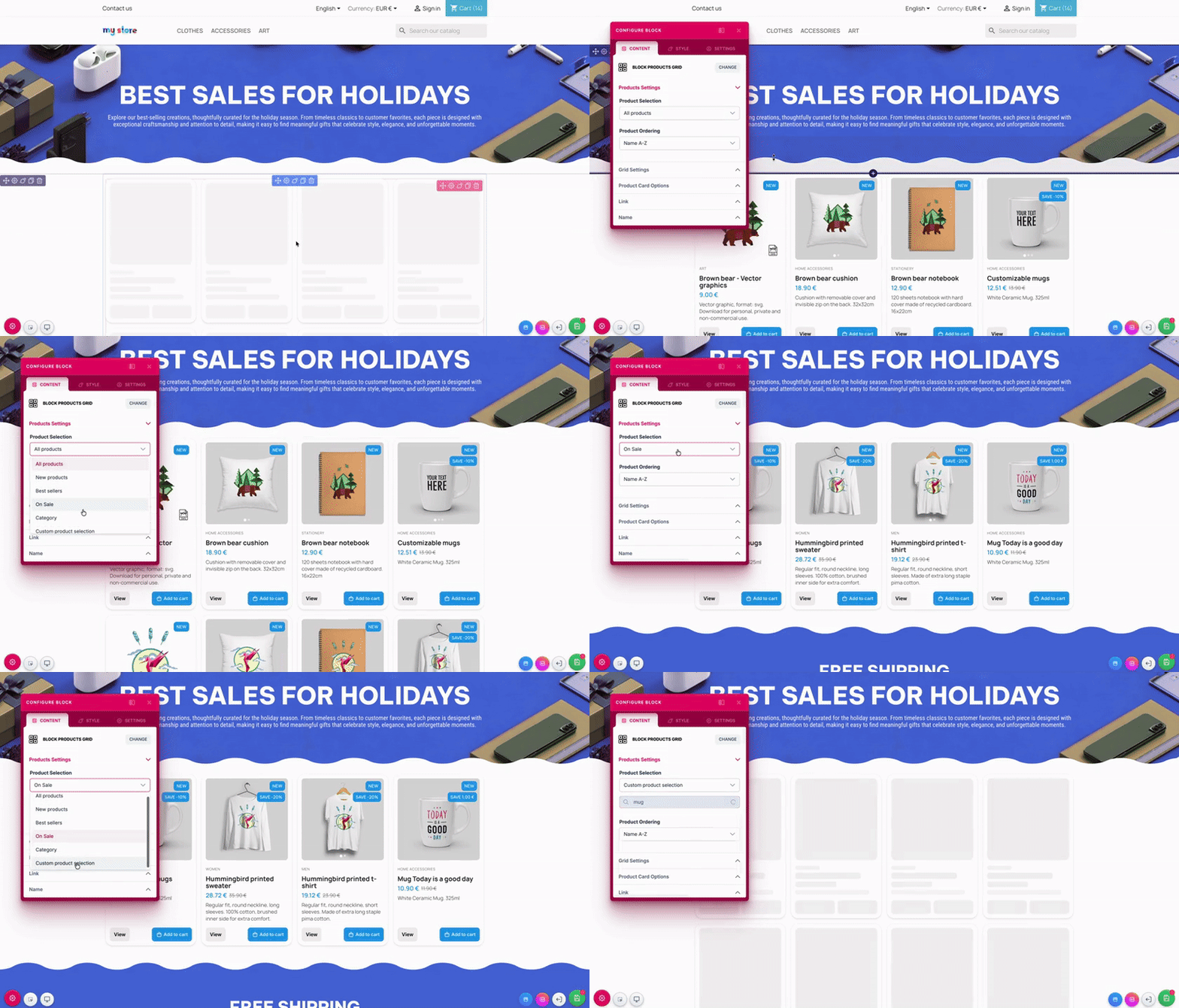
📦 Version 1.5.0 – Nouveau bloc ProductGrid La grosse nouveauté de cette version, c’est l’arrivée du bloc ProductGrid. Il permet d’afficher vos produits facilement, avec beaucoup plus de contrôle qu’avant. Sélection des produits : Tous les produits Nouveaux produits Meilleures ventes Produits en promotion Par catégorie (sélection multiple) Sélection manuelle de produits Options de tri : Nom (A-Z / Z-A) Prix (croissant / décroissant) Référence Date (récent / ancien) Personnalisation de l’affichage : Choix de la mise en page de la grille Nombre de colonnes et de lignes Gestion des éléments visibles sur les cartes (image, prix, nom, catégorie, description, référence, boutons…) Corrections et améliorations : Problème d’affichage du fond de section avec des diviseurs à marge négative corrigé Les accordéons ne se referment plus pendant l’édition Les modifications (nom, lien, ID, CSS personnalisé) sont maintenant bien prises en compte Correction de l’affichage des produits en promotion Plusieurs améliorations d’interface ---- 🏠 Roadmap prochaine version – Version 1.6.0 La prochaine version apporte une fonctionnalité très demandée : Éditeur de page d’accueil: Il sera possible d’éditer directement la page d’accueil depuis le page builder, sans passer par d’autres écrans. Côté technique pour le moment : Amélioration de la gestion de la sauvegarde pour plus de fiabilité et de fluidité Comme d’habitude, vos retours sont les bienvenus 🙂 Bonne création 🚀 v1.5.0-ldpagebuilder.zip
1 point
-
Hi, New user here, I just installed Prestashop 8.2.0, I want to add simple javascript/jQuery code right before </body> ? What file should I edit? or should I do it via backend? Thank you.1 point
-
Le bouton Mode démo en haut à droite ne serait-il pas actif par hasard ?1 point
-
Most likely you are missing the hook, which was not added correctly during upgrade. https://github.com/PrestaShop/PrestaShop/issues/26925 Validate if the hook actionValidateCustomerAddressForm is absent on database table ps_hook. SELECT * FROM ps_hook WHERE name = 'actionValidateCustomerAddressForm'; And you can fix it by adding INSERT IGNORE INTO `ps_hook` (`name`, `title`, `description`, `position`) VALUES ('actionValidateCustomerAddressForm', 'Customer address validation', 'This hook is called when a customer address is validated', '1'); This way you fix the address validation issue and do not have to edit core files or override them.1 point
-
Hello, These are the necessary changes: In themes/classic/templates/catalog/_partials/product-details.tpl: Remove {if $product.description} and the corresponding {/if}. Keep the li element that was inside it. Remove the 'Product Details' li element Move the product_details block below the the product_description one This is how it should look in the end: {block name='product_tabs'} <div class="tabs" style="margin-bottom: 40px;"> <ul class="nav nav-tabs" role="tablist"> <li class="nav-item"> <a class="nav-link active js-product-nav-active" data-toggle="tab" href="#description" role="tab" aria-controls="description" aria-selected="true">{l s='Description' d='Shop.Theme.Catalog'}</a> </li> {if $product.attachments} <li class="nav-item"> <a class="nav-link" data-toggle="tab" href="#attachments" role="tab" aria-controls="attachments">{l s='Attachments' d='Shop.Theme.Catalog'}</a> </li> {/if} {foreach from=$product.extraContent item=extra key=extraKey} <li class="nav-item"> <a class="nav-link" data-toggle="tab" href="#extra-{$extraKey}" role="tab" aria-controls="extra-{$extraKey}">{$extra.title}</a> </li> {/foreach} </ul> <div class="tab-content" id="tab-content"> <div class="tab-pane fade in active js-product-tab-active" id="description" role="tabpanel"> {block name='product_description'} <div class="product-description">{$product.description nofilter}</div> {/block} {block name='product_details'} {include file='catalog/_partials/product-details.tpl'} {/block} </div> {block name='product_attachments'} {if $product.attachments} <div class="tab-pane fade in" id="attachments" role="tabpanel"> <section class="product-attachments"> <p class="h5 text-uppercase">{l s='Download' d='Shop.Theme.Actions'}</p> {foreach from=$product.attachments item=attachment} <div class="attachment"> <h4><a href="{url entity='attachment' params=['id_attachment' => $attachment.id_attachment]}">{$attachment.name}</a></h4> <p>{$attachment.description}</p> <a href="{url entity='attachment' params=['id_attachment' => $attachment.id_attachment]}"> {l s='Download' d='Shop.Theme.Actions'} ({$attachment.file_size_formatted}) </a> </div> {/foreach} </section> </div> {/if} {/block} {foreach from=$product.extraContent item=extra key=extraKey} <div class="tab-pane fade in {$extra.attr.class}" id="extra-{$extraKey}" role="tabpanel" {foreach $extra.attr as $key => $val} {$key}="{$val}"{/foreach}> {$extra.content nofilter} </div> {/foreach} </div> </div> {/block} Then, in themes/classic/templates/catalog/_partials/product-details.tpl, replace <div class="js-product-details tab-pane fade{if !$product.description} in active{/if}" with <div class="js-product-details tab-pane fade in active" Check the attached screenshot to see how the result should look like
1 point
-
You didn’t break anythin, it’s just two different systems in PS9. /themes/ZOneTheme/mails/fr/*.html/.txt = legacy “raw” emails (old system). BO preview URLs like .../mail_theme/preview/... = Twig email themes, loaded from /mails/themes/<theme>/. In your screenshot, ZOneTheme only shows index for ps_specials because BO is only finding a module raw template there, you don’t have a real Twig mail theme generated for ZOneTheme, so it can’t list/order-preview order_conf, order_ship, etc. What you should do: Create the Twig mail theme folder: easiest: copy /mails/themes/classic → /mails/themes/ZOneTheme (or BO → Design → Email theme → select ZOneTheme → Generate with overwrite = YES) Clear cache: delete /var/cache/* Now edit the actual Twig email body, not .txt/.html: /mails/themes/ZOneTheme/templates/... (order confirmation template) After that, the preview should match your edits.1 point
-
TreRuote Have you managed to locate the causes of this problem? I have a similar one, and a lot of processes appeared. The first temporary solution that allowed me to restore the shop to working order, but did not definitively solve the problem, was to disable the Lightspeed Cash module. I simply changed its name via FTP, and even though the large number of processes did not disappear, the shop started to function somehow. (I hope this will help someone in the future.) However, I still do not know what causes the processes to get stuck in large numbers.1 point
-
Dieses Problem tritt meist auf, wenn das gewählte DHL-Produkt nicht zum Versandtyp passt. Was du prüfen solltest: Stelle sicher, dass Warenpost nur für zulässige Länder, Gewichte und Maße verwendet wird. Prüfe, ob dein DHL-Geschäftskonto Warenpost für die betroffenen Regionen wirklich aktiviert hat. Testweise den Versanddienst auf DHL Paket (Standard) umstellen – wenn das funktioniert, liegt das Problem eindeutig an Warenpost. Falls verfügbar, Debug/Log-Funktion im DHL Modul aktivieren, um die API-Antwort zu prüfen. In den meisten Fällen behebt der Wechsel von Warenpost zu DHL Paket das Problem sofort.1 point
-
Main region is in the UK1 point
-
Hi — this may help, and @Daresh is also correct. now we discuss 101 times...loool Using phpMyAdmin, you can sort your database by table size and row count to quickly identify which tables are growing abnormally. Without doing this, you are essentially guessing and won’t know where the actual bloat is coming from. Be aware that some modules store caches and logs in database tables, and these can grow very large over time if not managed properly. How to find large tables using phpMyAdmin: Log in to phpMyAdmin from your hosting control panel. Select your PrestaShop database from the left sidebar. Click the Structure tab (this is the default view). Scroll to the bottom of the table list and ensure the following columns are visible: Rows Data length Index length Size Click the Size column header to sort tables by total size (Data + Index). Alternatively, click Rows to sort by row count and identify log- or cache-heavy tables. Tables that stand out as unusually large are typically the source of database growth and performance issues. Here is an article that outlines common PrestaShop tables that tend to grow large, and which ones can typically be safely emptied or pruned (depending on your setup): https://prestaheroes.com/blogs/mysql-optimization/which-large-prestashop-tables-can-be-dropped-or-emptied-safely1 point
-
https://ecommerce-news.es/sylius-y-cyberfolks-adquieren-prestashop/ https://marketing4ecommerce.net/prestashop-adquirida-por-cyber_pixel/1 point
-
The short answer: yes, you can change your shop’s default currency from BGN to EUR. PrestaShop supports this, but there are a few things you need to understand before switching. Recommended method Add EUR as a new currency. Set the correct conversion rate between BGN and EUR. PrestaShop will calculate prices automatically based on that rate. Set EUR as the default shop currency. Check product prices, shipping rules, and payment methods. After confirming everything works, disable BGN. This is the safest approach on both PS 8.1 and PS 1.7.6. Cons and things to watch out for Product prices will be recalculated using the conversion rate. If rounding is not ideal, you may need to adjust individual prices. Old orders will remain in BGN. This is normal because PrestaShop stores the original order currency. Payment modules may need to be reconfigured or re-saved so they recognize EUR as the new default currency. Some carrier rules or free-shipping limits may have been set in BGN. Review these after switching. A few themes or custom modules might have hard-coded currency symbols that you need to update manually.1 point
-
You have fixed many on-page things already nice work. To move higher focus on authority: Get some quality backlinks Improve internal links to key products Add new helpful content regularly Google needs strong trust signals to push you to the top.1 point
-
I did notice in ps 9.0.0 and 9.0.1 admin-->experimental new carrier interface enabled by default, I disabled this as I prefered the original carrier interface. I do not know if using experimental carrier creates other issues but I also had issue in 9.0.0 where 3rd party module not called when carrier associated to it. I fixed the issue myself as one was not available on github yet, maybe now there is. Hope this message in a bottle helps someone.1 point
-
bonjour ça fait plusieurs semaines que je vous contacte par email aucune réponse, est-ce que vous êtes toujours en vie? ou c'est votre spectre qui va me répondre ?!1 point
-
what is the solution.. can you please explain1 point
-
TLDR: The server timezone could be different than the time applied to the start date for the voucher. Roll back the start time of a voucher to check. I figured it out, but I couldn't find any info on the issue, so here you go: This is what happened to me and how to fix it: I have a module that create account-specific codeless vouchers as referral rewards, these would apply automatically on checkout. Tried it all locally and no issue. When I installed said module on my live site, the email notifying of the voucher's creation was working, but the vouchers didn't display on My Vouchers in the customer's My account or apply on checkout. Reinstalled everything, still didn't work. Turns out, my server's timezone was UTC, but the vouchers were being created with the "from x date" setting being GMT+1 —one hour after—, so the vouchers wouldn't show up until an hour had passed from the voucher creation time —and patience is clearly not my thing. Try to roll back the time of a voucher's start date, see if that works. If it does, change the server's timezone.1 point
-
To have all data backed up makes sense. Save your shop as more hacking is most likely to happen the coming decade.1 point
-
You can check out my "Please choose" module. It works with checkboxes, radio options and color selections and is compatible with Prestashop 1.6 and 1.7. Here is the link to the module in the addon store: https://addons.prestashop.com/de/product.php?id_product=478511 point









.thumb.jpg.7ebe1db0b7038041605d37c862f6d9e5.jpg)