.png.022b5452a8f28f552bc9430097a16da2.png)

Leaderboard




Popular Content
Showing content with the highest reputation since 01/02/2026 in all areas
-
Le répertoire /classes était totalement corrompu. Le problème est désormais résolu.2 points
-
Im Kontaktformularmodul unter modules\contactform\contactform.php finden sich die erlaubten Dateiendungen in der Funktion sendMessage. Wenn das upgradesicher erweitert werden soll, musst du ein Modul-Override erstellen (https://devdocs.prestashop-project.org/9/modules/concepts/overrides/#override-a-module) public function sendMessage() { $extension = ['.txt', '.rtf', '.doc', '.docx', '.pdf', '.zip', '.png', '.jpeg', '.gif', '.jpg', '.webp'];2 points
-
https://prestaheroes.com/blogs/prestashop-alerts/prestashop-s-ownership-change-exposed-a-deeper-problem-why-shopify-ate-its-liver2 points
-
La sortie de PrestaShop 9 a malheureusement été un désastre en termes de gestion de version. La version 9.0.0 a été présentée comme la version « actuelle » à télécharger, ce qui a donné aux nouveaux administrateurs — ainsi qu’aux marchands existants — l’impression qu’il était sûr d’installer ou de mettre à jour, alors que ce n’était clairement pas le cas. S’appuyer sur la communauté pour tester une version majeure sur des boutiques en production est un très mauvais modèle, et de nombreux marchands en ont subi les conséquences. Espérons qu’avec la nouvelle direction de PrestaShop, cette mauvaise pratique cessera et que les futures versions majeures ne seront plus mises en avant comme étant prêtes pour la production avant de l’être réellement. Ce n’est qu’avec la version bêta de PrestaShop 9.1 que PrestaShop a clairement indiqué qu’elle n’est pas destinée aux administrateurs “classiques” et non techniques, ni à une mise à jour de boutiques en production. Tant qu’une version 9.x réellement stable n’existe pas, PrestaShop 9 doit être évité en production, en particulier par les utilisateurs non techniques.2 points
-
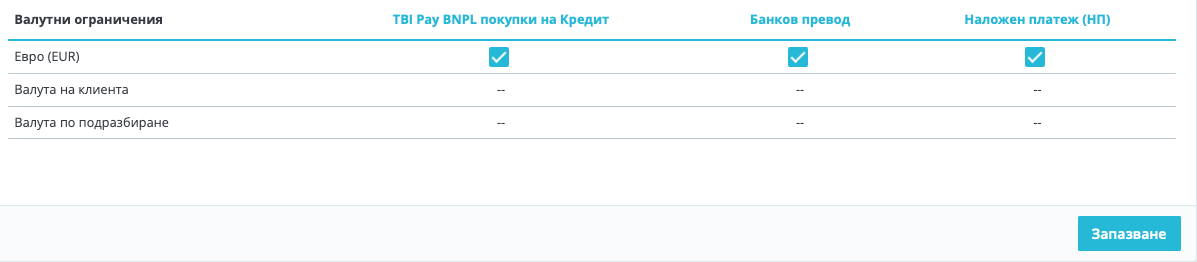
Hi, I have managed to change the currency successfully following these steps: 1. Add EUR as a new currency. 2. Set the correct conversion rate between BGN and EUR. PrestaShop will calculate prices automatically based on that rate. (optional, even if you don't do it when switch off BGN, the prices will remain the same w/out change ) 3. Set EUR as the default shop currency. 4.Disable BGN. You will see that after these steps, the prices will remain the same as they were, but in the new currency EUR. 5. Than you need to execute the following SQL queries: -- Convert base product prices from BGN to EUR UPDATE ps_product SET price = ROUND(price / 1.95583, 2), wholesale_price = ROUND(wholesale_price / 1.95583, 2); Convert shop-scoped prices (used even in single-shop installs) UPDATE ps_product_shop SET price = ROUND(price / 1.95583, 2), wholesale_price = ROUND(wholesale_price / 1.95583, 2); Now, everything should be ok. I realized that you need also to make two additional steps: 6. Change the prices of the transport! 7. Payment methods -> Settings: These were unchecked and I had to check them, because the currency was changed.
 2 points
 -
In PrestaShop 9, the order status email preview does not use your theme’s custom email templates. The preview pulls emails from the core fallback location, not from overridden theme folders. This is expected behavior and does not reflect what customers actually receive. Actual emails sent to customers will still use the correct theme and language templates. The preview tool is mainly for basic testing, not full template validation.2 points
-
Hi, In PrestaShop 9 the “Order status” email preview isn’t driven only by the old /mails/en/*.html files anymore. It uses the Twig email theme system, so it’s normal that footer.twig changes show up (Twig layout), while the main body still looks generic if you’re editing the wrong layer. What to do: BO → Design > Email theme: select your email theme and click Generate. Edit the Twig templates in /mails/themes/classic/ (templates/layouts/components), not just the language folder. Clear cache. And yes, preview breaking when /mails/themes/classic is missing looks like a fallback/bug, keep that folder.2 points
-
Hallo, Wenn Ihr Shop im Debug-Modus läuft, aber nicht im normalen Modul, müssen Sie in den meisten Fällen lediglich den Cache manuell leeren: https://www.mediacom87.fr/en/faq-how-to-clear-the-cache-manually-on-prestashop-17/2 points
-
I’d focus on tight keyword use, clean URLs, fast loading, and strong internal links. I’ve seen big gains just by improving product text, image names, and page structure.1 point
-
Hej, jak w temacie potrzebuję wprowadzić do swijego sklepu konfigurator który będzie wyświetlał warianty rozmiarowe po wybraniu modelu i rocznika samochodu. mam wstepnie przygotowany taki konfigurstor oparty gdzie kategorie i podkategorie sa mpodelami i rocznikami aut, natomiast lista pasujacych felg wyświetla się podczepiona jako link wygenerowany przez moduł Advanced search 5. ale 1 problem że konfigurowanie tego jest mozolne, a wczytywanie wyników trochę za powolne. może da sie to zorganizować lepiej i sprawniej.1 point
-
oui n'importe quoi ou effectivement vous pouvez la supprimer si la commande n'existe plus en bdd. (sinon le module détectera le transporteur MR et voudra la réassocier)1 point
-
pas de settings.inc dans PS 1.7 + mais dans /app/config/parameters.php1 point
-
It's been a long time since I've posted, but I've come up with a helpful tip while helping a friend develop a PrestaShop 9 website. I came up with a free way to embed responsive videos in product descriptions and any other HTML fields on the website. Enable the "Allow iframes on HTML fields" option (if it's disabled) on the "Shop Parameters > General" tab in the Back Office. Create a child theme (if you haven't already) to enable custom CSS to be added. Add the following to the themes/child_theme/assets/css/custom.css (this code makes the YouTube video responsive so it looks good on desktop, tablet and mobile): .embed-container { position: relative; padding-bottom: 56.25%; height: 0; overflow: hidden; max-width: 100%; margin-bottom: 1rem; } .embed-container iframe { position: absolute; top: 0; left: 0; width: 100%; height: 100%; } Upload the video to YouTube and choose either "Public" or "Unlisted" depending on whether you want the video searchable on your channel. Click the "Share" button on the video and then choose "Embed". Copy the <iframe> code to the product description or other HTML field in the Back Office and then add <p class="embed-container"> before the <iframe> code and </p> after the </iframe> code. I hope this helps someone.1 point
-
Hey, if you can attach the module here I can update it to work. Also make sure to include your prestashop version. I would need to know payment received order stat id. or from phpmyadmin or ps sql manager First, get the order_state ID(s) SELECT id_order_state, name FROM ps_order_state_lang WHERE name LIKE '%Payment%' OR name LIKE '%Received%'; Use those IDs in this report query This returns product + total qty for orders whose current status is “Payment Received”, within a date range: SELECT od.product_id, od.product_reference, od.product_name, SUM(od.product_quantity) AS qty_sold FROM ps_orders o JOIN ps_order_detail od ON od.id_order = o.id_order WHERE o.current_state IN (/* put id_order_state(s) here */) AND o.date_add >= '2026-01-01 00:00:00' AND o.date_add <= '2026-01-31 23:59:59' GROUP BY od.product_id, od.product_reference, od.product_name ORDER BY qty_sold DESC;1 point
-
Je souhaitais vous remercier pour la mise à jour du module et pour sa compatibilité avec Prestashop 9. Merci vous êtes un développeur qui a la main sur le cœur et je vous en remercie sincèrement !1 point
-
Hello PrestaShop community, I'm releasing a profesionnal dedicated penetration testing tool i used since years for PrestaShop 1.7.x ( and on a couple of days 8.x ) – designed for integrators, freelancers, hosting providers, and security teams who need to go beyond basic automated scanners. The goal: Simulate a real attacker on your PrestaShop instance (legally, with proper authorization) and generate a professional PDF report that developers, sysadmins, and CISOs can actually use. 🎯 What the tool does Core capabilities: Identifies critical vulnerabilities (SQLi, RCE, XXE, SSRF, etc.) specific to PrestaShop installations Audits system configuration (file permissions, backdoors, Lynis integration) Maps known CVEs through a dedicated, editable JSON database Generates 15-30 page PDF reports with CVSS scores, proof-of-concept evidence, and prioritized remediation Not a replacement for full manual pentesting – think of it as a productivity booster to quickly identify the most dangerous issues. 🔧 Key Features ✅ Web Application Penetration Tests : • SQL Injection: Time-based, Error-based, Boolean-based, Union-based • XXE: XML External Entity attacks • SSRF: Server-Side Request Forgery • RCE: Remote Code Execution via PHP deserialization • Command Injection: OS command injection vectors • Authentication Bypass: Back-office login bypass attempts • Open Redirect & CORS misconfigurations • Session security (cookies, HttpOnly, Secure flags) • SSL/TLS weak protocol detection • Rate limiting & brute-force protection checks 🔍 System-Level Audit : • Lynis integration (full Linux hardening audit) • Automatic spidering (endpoint discovery) • Vulnerable module detection • Sensitive file exposure checks • Backdoor hunting (known malicious patterns) • Dangerous file permission scanning • Database prefix verification 📊 PDF Reporting : • 15-30 page PDF with Viking Production branding • CVSS v3.1 risk scoring (0-10 scale) • Executive summary for management • Technical details + remediation steps • Prioritized action plan (P0/P1/P2) • Proof-of-concept payloads (sanitized) 🚀 Quick Demo (Less than 2 minutes) : # Standard audit (safe for production) python3 cve.py https://your-prestashop.tld # Full system audit + Lynis python3 cve.py https://your-prestashop.tld --path /var/www/prestashop # Generates: prestashop_security_report.pdf Sample output: Identifies PrestaShop version → Maps applicable CVEs → Tests vectors → Delivers PDF report. 🗄️ Extensible CVE Database : The tool uses a JSON CVE database you can customize: { "id": "CVE-2022-31181", "title": "SQL Injection Smarty Cache", "cvss_score": 9.8, "affected_versions": ["1.7.0.0", "1.7.8.6"], "payloads": ["<sanitized_payloads>"], "remediation": "Update to 1.7.8.7+" } 🎁 Why this tool? PrestaShop-specific: Tests actual CVEs affecting 1.7.x/8.x Production-ready reports: Not just "vulnerable/not vulnerable" Developer-friendly: Clear payloads, remediation steps Sysadmin integration: Lynis + file system checks Free & open-source: MIT license Actively maintained: 2026 roadmap includes 8.x support, ML anomaly detection 📚 Resources : GitHub: https://github.com/VikingProduction/CVE-prestashop.1-7.X-pentester README available in French & English ⚖️ IMPORTANT: Legal & Responsible Use Only ✅ Authorized use: Your own PrestaShop installations Client sites with written permission Staging/test environments Contractual security assessments ❌ Strictly prohibited: Testing third-party sites without authorization Production sites without owner consent Any illegal access attempts Law compliance of your country, in france: Article 323-1 Code Pénal, GDPR, NIS Directive. Questions? Need help with a specific CVE? Want to contribute new tests? Reply here or open an issue! Stay secure, Viking Production1 point
-
Yes, what is the best square payment gateway to use? I notice the free one I don't know if that is the best one.1 point
-
Hello, You should avoid upgrading for now. It is generally not worth the risk for a minor version update.1 point
-
Merci pour votre aide. Un de vos collegues ayant pris la main a résolu le probleme1 point
-
Merci pour votre retour, J'ai supprimé le fichier : class_index.php Toujours le meme souci. Ce fichier /classes/PrestaShopAutoload.php existe et je n'ai pas changé de version PHP récemment.1 point
-
Bug résolu avec l'aide @Eolia .... merci beaucoup et de ChatGPT Etape 1 - Modification cateogry-header.tpl <div id="js-product-list-header"> {if $listing.pagination.items_shown_from == 1} <div class="block-category card card-block"> <h1 class="h1">{$category.name}</h1> {* Textes utilisés par le JS "Voir plus / Voir moins" (doivent exister dans le DOM) *} <span id="readmore" style="display:none;">Voir plus</span> <span id="readless" style="display:none;">Voir moins</span> <div class="block-category-inner"> {if $category.description} <div id="category-description" class="text-muted"> {$category.description nofilter} </div> {/if} {if !empty($category.image.large.url)} <div class="category-cover"> <img src="{$category.image.large.url}" alt="{if !empty($category.image.legend)}{$category.image.legend}{else}{$category.name}{/if}" loading="lazy" width="141" height="180"> </div> {/if} </div> </div> {/if} </div> Etape 2 - Modification du custom.css avec l'ajout de : /* Cache la version longue de la description par défaut */ .text-muted .more_text { display: none; } /* Cache le bouton "Voir moins" par défaut */ .text-muted .read_less { display: none; }1 point
-
Bonjour, N'utilisez jamais les offres mutualisées d'OVH, avec Ionos, on est dans le pire du pire. Je propose un article sur le sujet : https://www.mediacom87.fr/votre-boutique-prestashop-merite-mieux-quun-hebergement-standard/1 point
-
Thanks for the link and the well-written article.1 point
-
Issue was caused by two overrides: 1. /override/classes/Cart.php 2. /override/modules/ps_shoppingcart/ps_shoppingcart.php One or both of these overrides were created by the module “Automatically add product to cart”. This caused no problem for a the last two years at least. Why it all of a sudden became a problem is not clear to me. Maybe Prestashop updated automatically and the original overrides became incompatible. This issue was resolved for me by forum member J.Sahu https://www.prestashop.com/forums/profile/673902-jsahu/. He fixed it quickly at a reasonable price.1 point
-
J'ai fini par réussi à aller au bout de la mise à jour en ne gardant que les modules natifs , la page mise à jour réussie s'est affichée mais par la suite je n'avais plus accès au gestionnaire des modules (page blanche) et après avoir vérifier plusieurs onglets pour voir si le reste fonctionnait j'ai eu un bug , le tout s'est mis en erreur 500. l'hebergeur m'a dit que c'était du à un module qui provoquait trop de requêtes mais je ne sais pas lequel, en mode debug je n'avais rien. Retour à la 8 pour l'instant1 point
-
Hi, New user here, I just installed Prestashop 8.2.0, I want to add simple javascript/jQuery code right before </body> ? What file should I edit? or should I do it via backend? Thank you.1 point
-
Hallo Caroline, vielen Dank für deine Antwort. Aber das löst mein Problem nicht. Ich kann bei meiner Standardversandart überhaupt gar nichts auswählen. Ich würde da gerne DHL-Paket hinterlegen. Ich überlege, ob es an den voreingestellten Versandkosten liegt, die sind nämlich nur 3 Euro, was natürlich zu wenig für ein Paket ist. Ansonsten sind alle Versandeinstellungen identisch mit "Gerollte Poster plus andere Waren" - und da kann ich "DHL-Paket" einstellen. Ich verschicke diese Sendungen normalerweise als Briefpost, aber bei größeren Bestellungen, die die 1.000 Gramm Marke knacken, verschicke ich es als Paket und übernehme die Mehrkosten. Diese Bestellungen muss ich jetzt im DHL-Portal mühsam per Hand eingeben.1 point
-
J'ai dû cliquer sans m'en apercevoir. Il était bien en mode démo. Pfff...!! 🙃 Pourtant j'ai pas trop abusé pendant les fêtes 🍷 Merci beaucoup1 point
-
Най-лесно е през CLI директно да промените цените, както е написал El Patron на 2 януари. Току що го направих и работи. Не забравяйте да направите backup преди промяната, за да можете да се върнете, ако има проблем.1 point
-
Auf Version 8 befindet sich die Datei unter app/Resources/geoip/GeoLite2-City.mmdb. Falls dieses Verzeichnis bei Ihnen nicht existiert, erstellen Sie es bitte.1 point
-
I finally got things to work, a big thank you to all of you !!!!🙏1 point
-
You didn’t break anythin, it’s just two different systems in PS9. /themes/ZOneTheme/mails/fr/*.html/.txt = legacy “raw” emails (old system). BO preview URLs like .../mail_theme/preview/... = Twig email themes, loaded from /mails/themes/<theme>/. In your screenshot, ZOneTheme only shows index for ps_specials because BO is only finding a module raw template there, you don’t have a real Twig mail theme generated for ZOneTheme, so it can’t list/order-preview order_conf, order_ship, etc. What you should do: Create the Twig mail theme folder: easiest: copy /mails/themes/classic → /mails/themes/ZOneTheme (or BO → Design → Email theme → select ZOneTheme → Generate with overwrite = YES) Clear cache: delete /var/cache/* Now edit the actual Twig email body, not .txt/.html: /mails/themes/ZOneTheme/templates/... (order confirmation template) After that, the preview should match your edits.1 point
-
TreRuote Have you managed to locate the causes of this problem? I have a similar one, and a lot of processes appeared. The first temporary solution that allowed me to restore the shop to working order, but did not definitively solve the problem, was to disable the Lightspeed Cash module. I simply changed its name via FTP, and even though the large number of processes did not disappear, the shop started to function somehow. (I hope this will help someone in the future.) However, I still do not know what causes the processes to get stuck in large numbers.1 point
-
maybe this helps, also always post the exact prestashop version and php version. How to check if the Experimental Product Page is enabled In the Back Office, go to: Advanced Parameters → New & Experimental Features Look for: New Product Page (or similar wording) If it is enabled, you are using the experimental Symfony product editor How to disable it (recommended for stability) To revert to the stable, legacy product page: Go to: Advanced Parameters → New & Experimental Features Disable: New / Experimental Product Page Save Clear cache: o Back Office: Advanced Parameters → Performance → Clear cache o Or manually delete /var/cache/* on the server Log out and log back into the Back Office After this, product editing and duplication will use the legacy product controller, which is significantly more stable and does not suffer from the endless-clone issue.1 point
-
Thank you El Patron - very useful and much appreciated! Dedicated would be nice to have, but is definitely out of my budget. Their VPS seems on par with Digital Ocean or Akamai which I currently use. Thanks again!1 point
-
Hi — this may help, and @Daresh is also correct. now we discuss 101 times...loool Using phpMyAdmin, you can sort your database by table size and row count to quickly identify which tables are growing abnormally. Without doing this, you are essentially guessing and won’t know where the actual bloat is coming from. Be aware that some modules store caches and logs in database tables, and these can grow very large over time if not managed properly. How to find large tables using phpMyAdmin: Log in to phpMyAdmin from your hosting control panel. Select your PrestaShop database from the left sidebar. Click the Structure tab (this is the default view). Scroll to the bottom of the table list and ensure the following columns are visible: Rows Data length Index length Size Click the Size column header to sort tables by total size (Data + Index). Alternatively, click Rows to sort by row count and identify log- or cache-heavy tables. Tables that stand out as unusually large are typically the source of database growth and performance issues. Here is an article that outlines common PrestaShop tables that tend to grow large, and which ones can typically be safely emptied or pruned (depending on your setup): https://prestaheroes.com/blogs/mysql-optimization/which-large-prestashop-tables-can-be-dropped-or-emptied-safely1 point
-
Perfekt ! Vielen Dank ! Nun läuft es tatsächlich wieder. Habe unter .var/cache/ beide Ordner gelöscht. Wenn Du mir als PM Deine email (PayPal sendest, spendiere ich Dir einen Kaffee)1 point
-
The short answer: yes, you can change your shop’s default currency from BGN to EUR. PrestaShop supports this, but there are a few things you need to understand before switching. Recommended method Add EUR as a new currency. Set the correct conversion rate between BGN and EUR. PrestaShop will calculate prices automatically based on that rate. Set EUR as the default shop currency. Check product prices, shipping rules, and payment methods. After confirming everything works, disable BGN. This is the safest approach on both PS 8.1 and PS 1.7.6. Cons and things to watch out for Product prices will be recalculated using the conversion rate. If rounding is not ideal, you may need to adjust individual prices. Old orders will remain in BGN. This is normal because PrestaShop stores the original order currency. Payment modules may need to be reconfigured or re-saved so they recognize EUR as the new default currency. Some carrier rules or free-shipping limits may have been set in BGN. Review these after switching. A few themes or custom modules might have hard-coded currency symbols that you need to update manually.1 point
-
You have fixed many on-page things already nice work. To move higher focus on authority: Get some quality backlinks Improve internal links to key products Add new helpful content regularly Google needs strong trust signals to push you to the top.1 point
-
bonjour ça fait plusieurs semaines que je vous contacte par email aucune réponse, est-ce que vous êtes toujours en vie? ou c'est votre spectre qui va me répondre ?!1 point
-
I got the same error. The weirdest part about this error is that it didn't show up in a local and an ubuntu vps installation but it does break on my managed hosting environment. There is a discussion here https://github.com/PrestaShop/PrestaShop/issues/38894 but the hosting environment is never mentioned. edit: The environment was mentioned here after all https://github.com/PrestaShop/PrestaShop/pull/38905 tl;dr make the following changes https://github.com/PrestaShop/PrestaShop/pull/38905/files and the backoffice will probably be fixed.1 point
-
I had the same issue with indexing delays and weak visibility on new categories. I started using https://www.searchseo.io/ to track keyword movements and fix on-page SEO stuff like duplicate metas and missing tags. It also helped me figure out which pages Google was ignoring. I’ve noticed better crawl rates and more stable rankings since then. Definitely worth checking if you're juggling lots of categories and products.1 point
-
This issue is related to your WAMP installation. You can refer to this post, which discusses the problem: https://github.com/PrestaShop/PrestaShop/issues/35044 The common solution is to edit the function in the app/AppKernel.php file during the installation process and restore it after. protected function getContainerClearCacheLockPath(): string { $class = $this->getContainerClass(); $cacheDir = sys_get_temp_dir();//$this->getCacheDir(); return sprintf('%s/%s.php.cache_clear.lock', $cacheDir, $class); }1 point
-
Hi @hohner, Yes, you can either add the checkbox to the template or use some JavaScript code to create it. You will also need to edit the controller the form is posting data to, in order to save that email address in the newsletter list, if the checkbox was ticked.1 point
-
May have found something here : https://themeforest.net/item/warehouse-responsive-prestashop-16-theme-blog/3178575?s_rank=1 [PS 8.1] 4.6.4 - 13.10.2023 =============================== [PS 1.7.8] 4.5.9 - 13.10.2023 =============================== FIX: - instagram widget fix - required action after upgrade - https://iqit-commerce.com/how-to-get-instagram-token/ It didnt completely work for me. Creating the token was OK, but I still have the message : {"error_type": "OAuthException", "code": 400, "error_message": "Insufficient developer role"} when clicking on the button "COnnect with your instagram" on the back office. Hope it will help.1 point
-
L'extension "Sconnect" peut-être installée sur les navigateurs pour vous connecter de manière sécurisée à votre compte CIC ou autre banque via SafeTrans (le lecteur de carte bancaire qui ressemble a un calculatrice). Celle-ci laisse systématiquement cette trace dans les éditeurs HTML de tous les sites. Il faut donc désactiver ce module lorsque vous ne l'utilisez pas, c'est à dire tout le temps, sauf quand vous allez sur le site de votre banque ou vous les réactiverez. Ce module est développé par Thales Digital Identity and Security (anciennement Gemalto) est une filiale du groupe d'électronique français Thales, on a déjà remonté le problème en 2018 et 2020 mais ça n'a rien changé...1 point
-
You can check out my "Please choose" module. It works with checkboxes, radio options and color selections and is compatible with Prestashop 1.6 and 1.7. Here is the link to the module in the addon store: https://addons.prestashop.com/de/product.php?id_product=478511 point