.png.022b5452a8f28f552bc9430097a16da2.png)
Leaderboard




Popular Content
Showing content with the highest reputation since 01/01/2026 in Posts
-
Le répertoire /classes était totalement corrompu. Le problème est désormais résolu.2 points
-
Im Kontaktformularmodul unter modules\contactform\contactform.php finden sich die erlaubten Dateiendungen in der Funktion sendMessage. Wenn das upgradesicher erweitert werden soll, musst du ein Modul-Override erstellen (https://devdocs.prestashop-project.org/9/modules/concepts/overrides/#override-a-module) public function sendMessage() { $extension = ['.txt', '.rtf', '.doc', '.docx', '.pdf', '.zip', '.png', '.jpeg', '.gif', '.jpg', '.webp'];2 points
-
https://prestaheroes.com/blogs/prestashop-alerts/prestashop-s-ownership-change-exposed-a-deeper-problem-why-shopify-ate-its-liver2 points
-
La sortie de PrestaShop 9 a malheureusement été un désastre en termes de gestion de version. La version 9.0.0 a été présentée comme la version « actuelle » à télécharger, ce qui a donné aux nouveaux administrateurs — ainsi qu’aux marchands existants — l’impression qu’il était sûr d’installer ou de mettre à jour, alors que ce n’était clairement pas le cas. S’appuyer sur la communauté pour tester une version majeure sur des boutiques en production est un très mauvais modèle, et de nombreux marchands en ont subi les conséquences. Espérons qu’avec la nouvelle direction de PrestaShop, cette mauvaise pratique cessera et que les futures versions majeures ne seront plus mises en avant comme étant prêtes pour la production avant de l’être réellement. Ce n’est qu’avec la version bêta de PrestaShop 9.1 que PrestaShop a clairement indiqué qu’elle n’est pas destinée aux administrateurs “classiques” et non techniques, ni à une mise à jour de boutiques en production. Tant qu’une version 9.x réellement stable n’existe pas, PrestaShop 9 doit être évité en production, en particulier par les utilisateurs non techniques.2 points
-
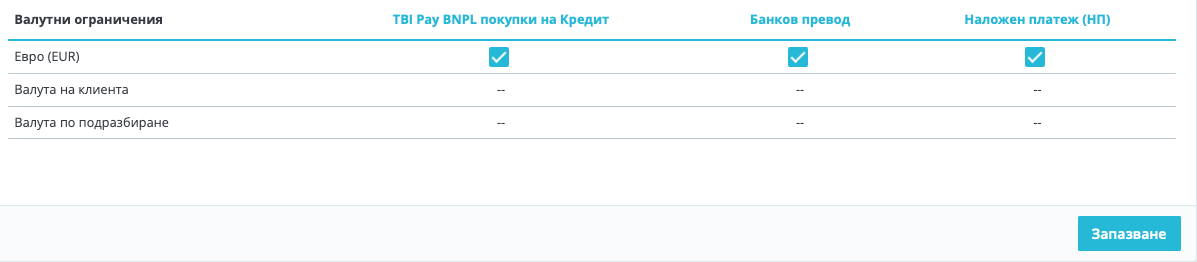
Hi, I have managed to change the currency successfully following these steps: 1. Add EUR as a new currency. 2. Set the correct conversion rate between BGN and EUR. PrestaShop will calculate prices automatically based on that rate. (optional, even if you don't do it when switch off BGN, the prices will remain the same w/out change ) 3. Set EUR as the default shop currency. 4.Disable BGN. You will see that after these steps, the prices will remain the same as they were, but in the new currency EUR. 5. Than you need to execute the following SQL queries: -- Convert base product prices from BGN to EUR UPDATE ps_product SET price = ROUND(price / 1.95583, 2), wholesale_price = ROUND(wholesale_price / 1.95583, 2); Convert shop-scoped prices (used even in single-shop installs) UPDATE ps_product_shop SET price = ROUND(price / 1.95583, 2), wholesale_price = ROUND(wholesale_price / 1.95583, 2); Now, everything should be ok. I realized that you need also to make two additional steps: 6. Change the prices of the transport! 7. Payment methods -> Settings: These were unchecked and I had to check them, because the currency was changed.
 2 points
 -
In PrestaShop 9, the order status email preview does not use your theme’s custom email templates. The preview pulls emails from the core fallback location, not from overridden theme folders. This is expected behavior and does not reflect what customers actually receive. Actual emails sent to customers will still use the correct theme and language templates. The preview tool is mainly for basic testing, not full template validation.2 points
-
Hi, In PrestaShop 9 the “Order status” email preview isn’t driven only by the old /mails/en/*.html files anymore. It uses the Twig email theme system, so it’s normal that footer.twig changes show up (Twig layout), while the main body still looks generic if you’re editing the wrong layer. What to do: BO → Design > Email theme: select your email theme and click Generate. Edit the Twig templates in /mails/themes/classic/ (templates/layouts/components), not just the language folder. Clear cache. And yes, preview breaking when /mails/themes/classic is missing looks like a fallback/bug, keep that folder.2 points
-
Hallo, Wenn Ihr Shop im Debug-Modus läuft, aber nicht im normalen Modul, müssen Sie in den meisten Fällen lediglich den Cache manuell leeren: https://www.mediacom87.fr/en/faq-how-to-clear-the-cache-manually-on-prestashop-17/2 points
-
Hej, jak w temacie potrzebuję wprowadzić do swijego sklepu konfigurator który będzie wyświetlał warianty rozmiarowe po wybraniu modelu i rocznika samochodu. mam wstepnie przygotowany taki konfigurstor oparty gdzie kategorie i podkategorie sa mpodelami i rocznikami aut, natomiast lista pasujacych felg wyświetla się podczepiona jako link wygenerowany przez moduł Advanced search 5. ale 1 problem że konfigurowanie tego jest mozolne, a wczytywanie wyników trochę za powolne. może da sie to zorganizować lepiej i sprawniej.1 point
-
oui n'importe quoi ou effectivement vous pouvez la supprimer si la commande n'existe plus en bdd. (sinon le module détectera le transporteur MR et voudra la réassocier)1 point
-
pas de settings.inc dans PS 1.7 + mais dans /app/config/parameters.php1 point
-
Je souhaitais vous remercier pour la mise à jour du module et pour sa compatibilité avec Prestashop 9. Merci vous êtes un développeur qui a la main sur le cœur et je vous en remercie sincèrement !1 point
-
Dans la table ps_mondialrelay_selected_relay remplissez les colonnes avec des valeurs fictives tracking_url label_url expedition_num date_label_generation pour cette commande1 point
-
I’ve run into similar OAuth 400 issues before, and clearing the Instagram connection inside the module settings and redoing the app permissions from scratch in the Instagram account usually fixed it. Sometimes the token gets revoked without warning. I’ve had to reset mine a few times, even though I was just using features like how to see what someone likes on instagram for my own checks. Also make sure your server time is synced, since that can break the handshake.1 point
-
SOLVED 1. Installed an blanc version of prestashop. 2. Deleted costumer and costumer group from my clone. 3. copied structure with auto increment to clone database from the blanc version 4. deleted the version form my live shop and copied the new data also with auto increment to the live shop1 point
-
Ok, so heres's the deal with this. Apparently Prestashop moved from swiftmailer (with PS 8 ) to symfony mailer (with PS 9). It appears that my host was blocking the new mailer from sending the emails externally. We had to change our SMTP settings to a gmail server to get it to work. We're not sure what changed between mailers, but this should not be a thing and needs to be looked at within Prestashop. I've seen other people with the same issue.1 point
-
This is what I have found https://addons.prestashop.com/en/payment-card-wallet/52036-square-official-sell-online-and-in-store.html My question is will the customers check out using Square to make the payment?1 point
-
Merci pour votre retour, J'ai supprimé le fichier : class_index.php Toujours le meme souci. Ce fichier /classes/PrestaShopAutoload.php existe et je n'ai pas changé de version PHP récemment.1 point
-
Bonjour, Pourquoi ne pas proposer un système de licence pour chaque abonnement ? parce que là, il est vrai que ça ne donne pas envie de l'installer ni même de tester alors qu'au premier abord votre module a l'air très bien. Bonne continuation.1 point
-
To the new owners. Please do something about the ridiculous amount of ads shown in the forums. It's a joke. Not the "ha, ha," funny kind. It's the uncool, you are not a real business kind.1 point
-
I have the same question and I’m running into this exact issue with PrestaShop. Every time I try to modify robots.txt manually, it seems to get overwritten automatically. I also want to add a custom rule for a specific user agent, but it’s unclear where PrestaShop expects these changes to be made. From what I can tell, editing the file directly at the root isn’t reliable. I’m wondering if there’s a setting in the back office or a config file where this should be defined instead. If anyone knows the correct way to make this change persist, I’d really appreciate the guidance.1 point
-
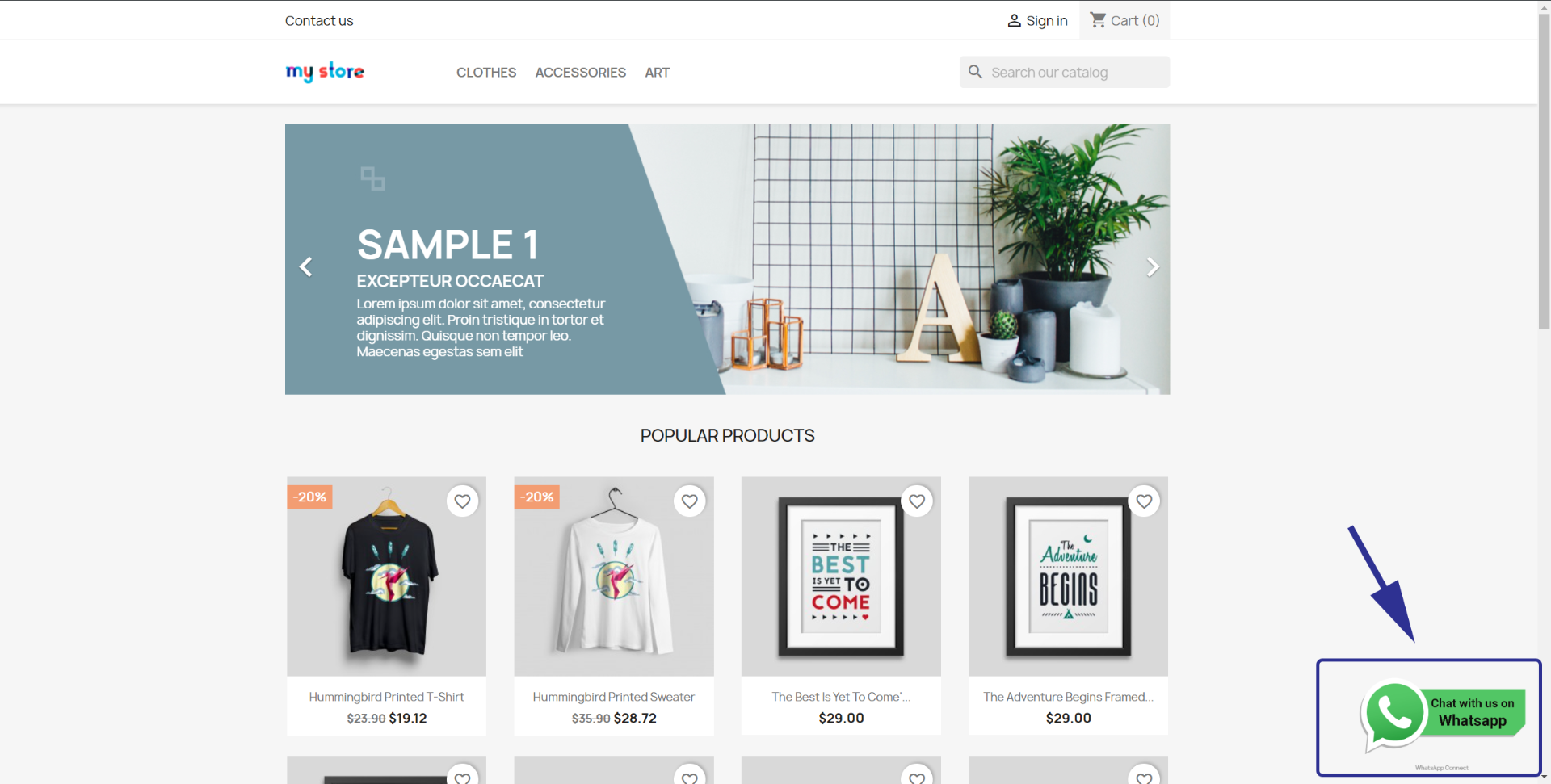
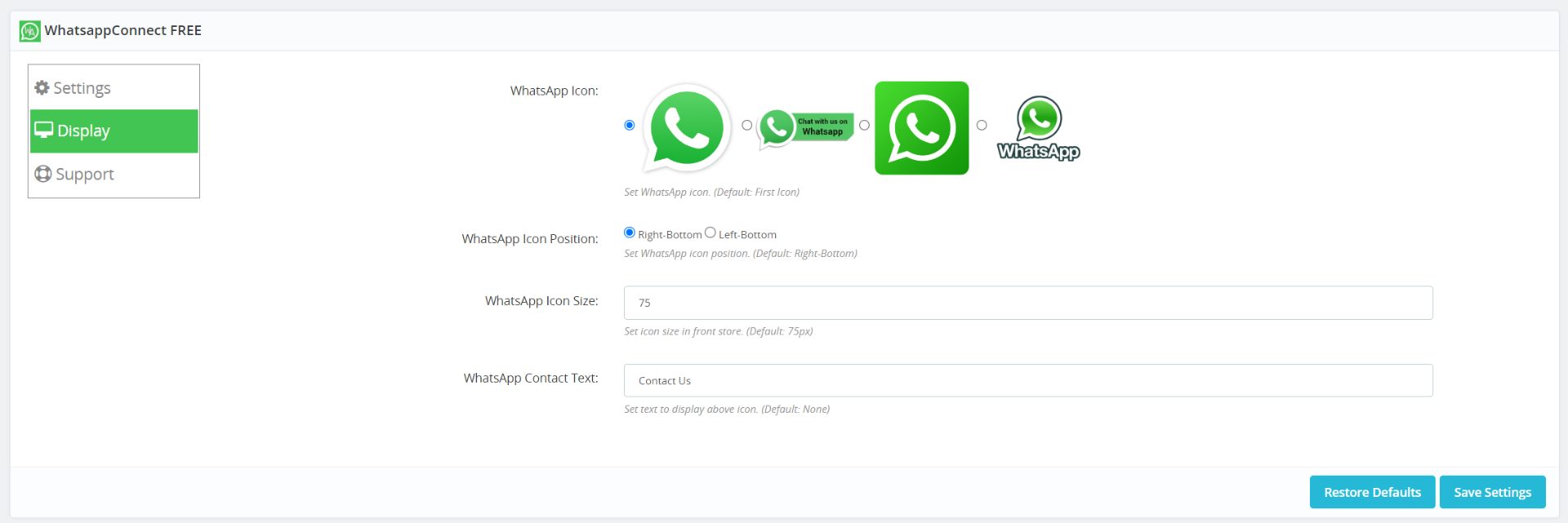
WhatsApp Connect - affiche un bouton de message WhatsApp flottant et personnalisable, à la fois pour les sites Web de bureau et mobiles FONCTIONNALITÉS : Afficher le bouton de message WhatsApp Plusieurs styles de boutons au choix Personnalisation latérale flottante Texte supplémentaire au-dessus du bouton Fonctionne également sur mobile DOWNLOAD LINK: WhatsappConnect_v1.6.5
1 point
-
The real question is: what new features in later PrestaShop releases actually make upgrading appealing? Historically, PrestaShop’s major releases rarely introduce front-office features that materially increase sales. Most changes are architectural, and the practical consequence is that merchants are forced to repurchase compatible modules and themes. From a merchant’s perspective, this is a poor business model. In my experience, PrestaShop 8 installations have also proven to be more susceptible to hacks than stable 1.7 shops. As for PrestaShop 9, there are only a handful of genuinely new features introduced in 9.0 (for example, unlimited guest checkout using the same email), and even those were broken in 9.0.1. From a revenue and growth standpoint, upgrading PrestaShop itself is rarely what drives results. Increasing sales through new features does not require a platform upgrade. The same functionality can almost always be implemented on 1.7 if you know what features are missing. So how do you identify those gaps? By analyzing competitors in your product vertical and studying best-in-class e-commerce sites such as Walmart or Newegg. Look at what they are doing to improve the visitor experience—navigation, filtering, checkout flow, trust signals, performance—and implement comparable improvements. In short, rather than upgrading to a new PrestaShop version for minimal or no tangible gain, the better investment is to upgrade features that improve user experience and conversion, regardless of the core version.1 point
-
Thank you for sharing!1 point
-
PrestaShop 9 non è pronto per un utilizzo generale. Per molti mesi la versione 9.0.x è stata presentata come una release “corrente” o utilizzabile, quando in realtà richiedeva un livello di competenza tecnica che la maggior parte dei commercianti e degli amministratori non tecnici non possiede. Solo recentemente PrestaShop ha chiarito ufficialmente che l’attuale versione 9.x è una beta e non è destinata all’uso in produzione da parte di amministratori non tecnici. Questa conferma è in linea con quanto molti sviluppatori e agenzie affermano fin dall’uscita iniziale della 9.0.0. Raccomandazione pratica: Restare su PrestaShop 8.x per i negozi esistenti Scegliere PrestaShop 8.x per qualsiasi nuovo negozio oggi Non tentare l’aggiornamento a PS9 a meno di essere sviluppatori o di disporre di un team tecnico esperto e di un ambiente di staging adeguato PrestaShop 8 rimane, al momento, l’unica opzione stabile e sicura per l’uso in produzione. Ci si augura che, sotto la nuova proprietà di PrestaShop, le future release vengano comunicate in modo più responsabile, con avvisi più chiari e senza presentare versioni principali non mature come pronte per l’adozione generale. La community non dovrebbe essere utilizzata come gruppo di test implicito per software critico in produzione.1 point
-
Thanks for the link and the well-written article.1 point
-
Effectuez une première importation sans les catégories. Créez ensuite vos propres catégories dans votre boutique. Puis, utilisez le module d'édition en masse pour y placer vos produits. La méthode la plus efficace dépend du nombre de produits.1 point
-
Issue was caused by two overrides: 1. /override/classes/Cart.php 2. /override/modules/ps_shoppingcart/ps_shoppingcart.php One or both of these overrides were created by the module “Automatically add product to cart”. This caused no problem for a the last two years at least. Why it all of a sudden became a problem is not clear to me. Maybe Prestashop updated automatically and the original overrides became incompatible. This issue was resolved for me by forum member J.Sahu https://www.prestashop.com/forums/profile/673902-jsahu/. He fixed it quickly at a reasonable price.1 point
-
J'ai fini par réussi à aller au bout de la mise à jour en ne gardant que les modules natifs , la page mise à jour réussie s'est affichée mais par la suite je n'avais plus accès au gestionnaire des modules (page blanche) et après avoir vérifier plusieurs onglets pour voir si le reste fonctionnait j'ai eu un bug , le tout s'est mis en erreur 500. l'hebergeur m'a dit que c'était du à un module qui provoquait trop de requêtes mais je ne sais pas lequel, en mode debug je n'avais rien. Retour à la 8 pour l'instant1 point
-
Thank you, I had a 1.7.8 running but somehow I got major errors after a update and after resetting the backup i still had errors, products not showing in my orders. etc. so I decided to upgrade to a new version instead. But horror as well, going to work on 8.2.3 right away. I have to get it back running asap. No income this way.1 point
-
The first thing I recommend is reviewing competitor shops within your product vertical. Look closely at the features, UX patterns, and trust signals they implement, and identify what your own store is missing or under-delivering on. Customization must always be balanced with update safety. Best practice is to apply all changes on a staging environment first, take full backups of production, and only then deploy tested changes live. From an infrastructure perspective, follow proven best practices: use the best hosting your budget reasonably supports, SSD or NVMe storage, PHP-FPM with dedicated resources, and—something many overlook—properly tuning MySQL instead of relying on default out-of-the-box settings. From experience, store owners and administrators can only take a business so far on their own. To scale meaningfully, you eventually need an agency or technical partner that understands your product vertical, actively analyzes competitors, identifies missed opportunities, and brings stronger ideas to the table—someone focused on taking the business to the next level rather than simply maintaining the status quo.1 point
-
It was a 3rd part module (officially compatible with PS 9) giving troubles. Thank you all1 point
-
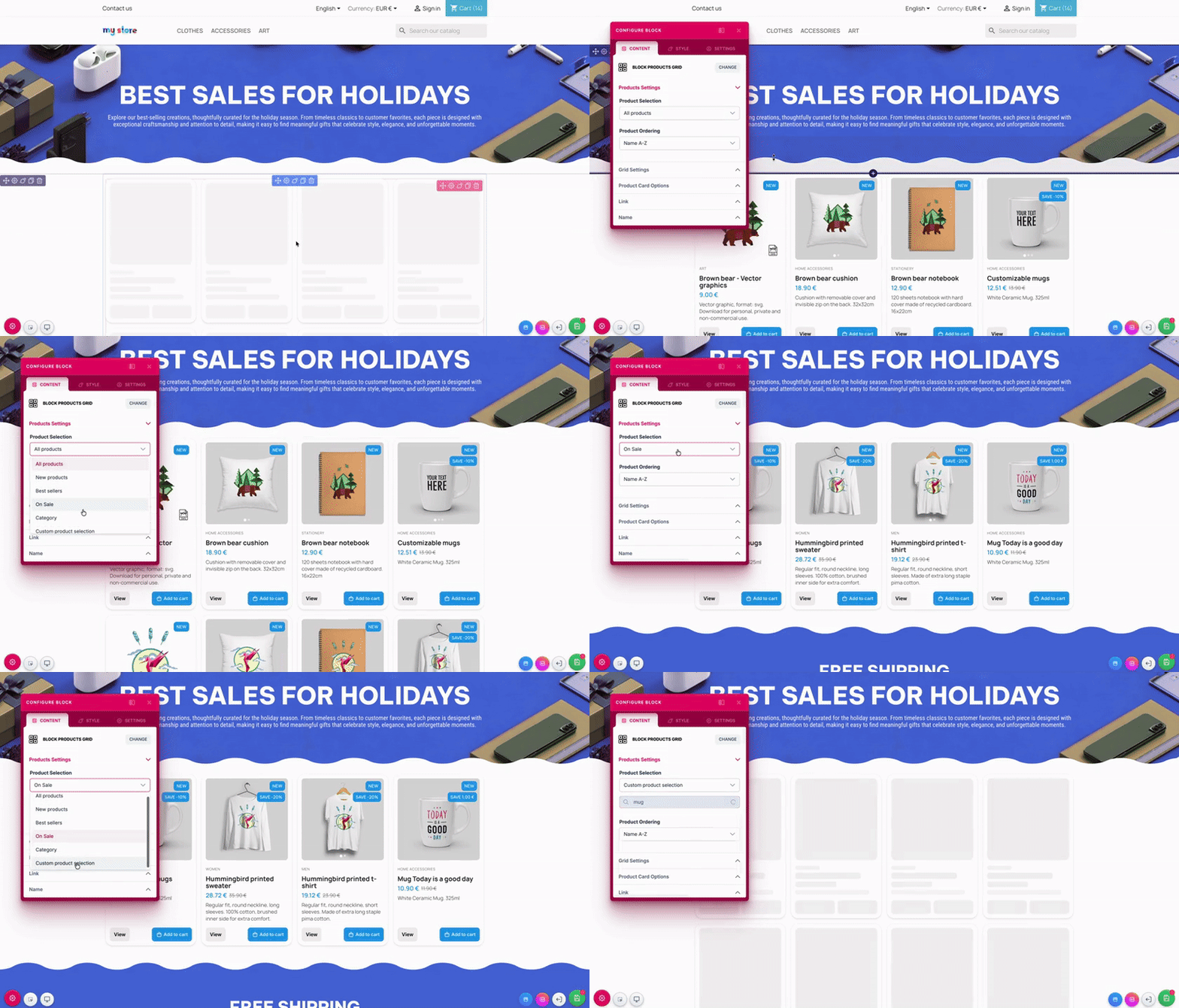
📦 Version 1.5.0 – Nouveau bloc ProductGrid La grosse nouveauté de cette version, c’est l’arrivée du bloc ProductGrid. Il permet d’afficher vos produits facilement, avec beaucoup plus de contrôle qu’avant. Sélection des produits : Tous les produits Nouveaux produits Meilleures ventes Produits en promotion Par catégorie (sélection multiple) Sélection manuelle de produits Options de tri : Nom (A-Z / Z-A) Prix (croissant / décroissant) Référence Date (récent / ancien) Personnalisation de l’affichage : Choix de la mise en page de la grille Nombre de colonnes et de lignes Gestion des éléments visibles sur les cartes (image, prix, nom, catégorie, description, référence, boutons…) Corrections et améliorations : Problème d’affichage du fond de section avec des diviseurs à marge négative corrigé Les accordéons ne se referment plus pendant l’édition Les modifications (nom, lien, ID, CSS personnalisé) sont maintenant bien prises en compte Correction de l’affichage des produits en promotion Plusieurs améliorations d’interface ---- 🏠 Roadmap prochaine version – Version 1.6.0 La prochaine version apporte une fonctionnalité très demandée : Éditeur de page d’accueil: Il sera possible d’éditer directement la page d’accueil depuis le page builder, sans passer par d’autres écrans. Côté technique pour le moment : Amélioration de la gestion de la sauvegarde pour plus de fiabilité et de fluidité Comme d’habitude, vos retours sont les bienvenus 🙂 Bonne création 🚀 v1.5.0-ldpagebuilder.zip
1 point
-
Hallo Caroline, vielen Dank für deine Antwort. Aber das löst mein Problem nicht. Ich kann bei meiner Standardversandart überhaupt gar nichts auswählen. Ich würde da gerne DHL-Paket hinterlegen. Ich überlege, ob es an den voreingestellten Versandkosten liegt, die sind nämlich nur 3 Euro, was natürlich zu wenig für ein Paket ist. Ansonsten sind alle Versandeinstellungen identisch mit "Gerollte Poster plus andere Waren" - und da kann ich "DHL-Paket" einstellen. Ich verschicke diese Sendungen normalerweise als Briefpost, aber bei größeren Bestellungen, die die 1.000 Gramm Marke knacken, verschicke ich es als Paket und übernehme die Mehrkosten. Diese Bestellungen muss ich jetzt im DHL-Portal mühsam per Hand eingeben.1 point
-
J'ai dû cliquer sans m'en apercevoir. Il était bien en mode démo. Pfff...!! 🙃 Pourtant j'ai pas trop abusé pendant les fêtes 🍷 Merci beaucoup1 point
-
Bonjour, Vos actions sont bien dans le HTML, donc le souci vient presque sûrement des icônes (police d’icônes) qui ne se charge pas. À vérifier : DevTools → Network → filtre woff/woff2 puis rechargez : s’il y a des 404 / blocked / MIME type, c’est la cause. Corrigez les MIME types côté serveur (souvent le problème) : Apache : AddType font/woff .woff AddType font/woff2 .woff2 Videz le cache PrestaShop / désactivez temporairement la minification CSS/JS et retestez. En général, après correction des fonts/MIME, les 3 icônes réapparaissent.1 point
-
Bonjour Fred ! J'ai vu beaucoup de vos messages en faisant mes recherches... Et effectivement je me suis tourné vers les modules Paypal et Stripe. Et aucun souci ça marche du tonnerre ! Merci pour votre retour d'expérience1 point
-
Auf Version 8 befindet sich die Datei unter app/Resources/geoip/GeoLite2-City.mmdb. Falls dieses Verzeichnis bei Ihnen nicht existiert, erstellen Sie es bitte.1 point
-
Because your preview URL is .../mail_theme/preview/classic, you’re previewing the Twig email theme “classic”, not the legacy /mails/fr/order_conf.txt. So editing order_conf.txt won’t show up there. Do this: Edit the Twig template under /mails/themes/classic/ (not /mails/fr/). BO → Design → Email theme → Generate (for your language). Delete /var/cache/* and refresh. There isn’t a separate “admin cache” for this beyond regenerating + clearing /var/cache.1 point
-
Thanks I will test.1 point
-
Thank you El Patron - very useful and much appreciated! Dedicated would be nice to have, but is definitely out of my budget. Their VPS seems on par with Digital Ocean or Akamai which I currently use. Thanks again!1 point
-
Start with logging in to phpMyAdmin and sort the columns descending by size, check which ones are the largest.1 point
-
what is the solution.. can you please explain1 point
-
Je viens à nouveau de remonter le problème depuis le site Thales, mais ils me demandent d'avoir un compte pour traiter la demande... Je réponds quand même on verra ....1 point
-
May have found something here : https://themeforest.net/item/warehouse-responsive-prestashop-16-theme-blog/3178575?s_rank=1 [PS 8.1] 4.6.4 - 13.10.2023 =============================== [PS 1.7.8] 4.5.9 - 13.10.2023 =============================== FIX: - instagram widget fix - required action after upgrade - https://iqit-commerce.com/how-to-get-instagram-token/ It didnt completely work for me. Creating the token was OK, but I still have the message : {"error_type": "OAuthException", "code": 400, "error_message": "Insufficient developer role"} when clicking on the button "COnnect with your instagram" on the back office. Hope it will help.1 point
-
Thanks for the tip, I wanted to try, but the developer's support has completely stopped and I can't even contact him through a ticket - because to create a ticket, you need to extend the support. And to be honest, I don't want to renew support for €70 because of this problem1 point
-
I found the answer by myself, inspired by some github search https://github.com/PrestaShop/PrestaShop/issues/15503 global $kernel; if(!$kernel){ require_once _PS_ROOT_DIR_.'/app/AppKernel.php'; $kernel = new \AppKernel('prod', false); $kernel->boot(); } needs to be called before.1 point
-
My answer is quite old too but i needed it in an 1.7.5 shop https://www.majory-cubizolles.fr/blog/inserer-une-page-cms-sur-une-page-produit-astuce-prestashop/ https://stackoverflow.com/questions/16449583/show-a-smarty-variable-with-html-content/33900878 Call your content in the tpl file templates/errors/not-found.tpl : {* 16 is the CMS Page used to store the message *} {assign var=cms_content value=CMS::getCMSContent(16)} {if $cms_content.content} <div class="contentCms"> {$cms_content.content nofilter} </div> {else} {* default message *} <h4>{l s='Sorry for the inconvenience.' d='Shop.Theme.Global'}</h4> <p>{l s='Search again what you are looking for' d='Shop.Theme.Global'}</p> {/if}1 point
-
Bueno pues me respondo yo mismo por si le pasa a alguien más: resulta que además de activar el permiso para ver las estadísticas, debe tener permiso para ver los módulos de cada sección de las estadísticas, algo que yo había deshabilitado porque no permito ver ningún módulo a los empleados. Es decir, en la columna de la derecha, Módulos, deben tener "Ver" activado los módulos: Tabla de mando de estadísticas, Mejores fabricantes, Mejores productos, etc. Saludos.1 point