All Activity
- Past hour
-
 erinhurst01 joined the community
 -
 s666netcom joined the community
 -
 Beste Balayage1 joined the community
 -
 kmspico1z joined the community
 -
 gimoyof596 joined the community
 -
 Aromatic Bouquets joined the community
 -
 judiacevedo joined the community
 - Today
-
 polymarketofficial1 joined the community
 -
 zuhd changed their profile photo
 -
 valorbiolabs changed their profile photo
 - Yesterday
-

Bouton radio fiche produit hors déclinaison
Mediacom87 replied to Seb_56's topic in Discussion générale
Recherche Module Addons PrestaShop à votre place. -
 freedomlaundryco changed their profile photo
 -
Pouvez-vous développer pour la communauté ? Je ne clic pas sur les liens externes.
-
Bouton radio fiche produit hors déclinaison
Mediacom87 replied to Seb_56's topic in Discussion générale
Oui -
Bouton radio fiche produit hors déclinaison
Mediacom87 replied to Seb_56's topic in Discussion générale
Mais quel rapport ? Vous planez littéralement dans une autre dimension. Me faire une remarque sur l'entraide c'est réellement ne rien connaître à rien. -
 Hi everyone, I am running a PrestaShop store and recently tried to integrate a custom payment flow that depends on checking account balance from First Abu Dhabi Bank before confirming certain high value orders. The problem I am facing is that the balance inquiry part is not returning consistent results. Sometimes it shows an outdated balance and other times it just fails silently without throwing a clear error. This is causing orders to go through when they should not, or get stuck in pending even when funds are available. I am not using a paid module for this, just a custom implementation using FAB’s API along with a small helper module I wrote to hook into order validation. Everything else in the checkout flow works fine, including payment callbacks, but this balance check step is unreliable. Has anyone here worked with FAB APIs or built something similar where external balance verification is needed before order confirmation? I am trying to understand if this is a timing issue, caching problem, or something related to how PrestaShop handles external requests during checkout. Any guidance or similar experiences would really help.
 -
@Mediacom87Que vous perceviez l'entraide comme une menace à votre activité, je le comprends.
-
 Merci d'avoir remarqué mon erreur, ça fonctionne, je vais essayer d'avancer, j'ai trouvé un tuto qui parle de cloudflare, je vais regarder... mes compétences sont limitées. Ecore merci
 -
Bouton radio fiche produit hors déclinaison
Mediacom87 replied to Seb_56's topic in Discussion générale
Pardon ? C'est un forum pas un service de support. Donc, oui j'ai encore le droit de comprendre pourquoi vous ne souhaitez pas utiliser LA technologie la plus adaptée pour votre demande. -
 SFGM changed their profile photo
 -
 lkiconsultingg changed their profile photo
 -
Pourriez-vous arrêter de dévier la discussion svp, j'aimerais avoir des réponses en lien avec ma question, merci. Si vous avez des pistes, je suis preneur, sinon, j'attendrai des réactions pertinentes.
-
Erreur concernant la licence ou la version du module : PHP est-il tout simplement incorrect ou autre chose ?
-
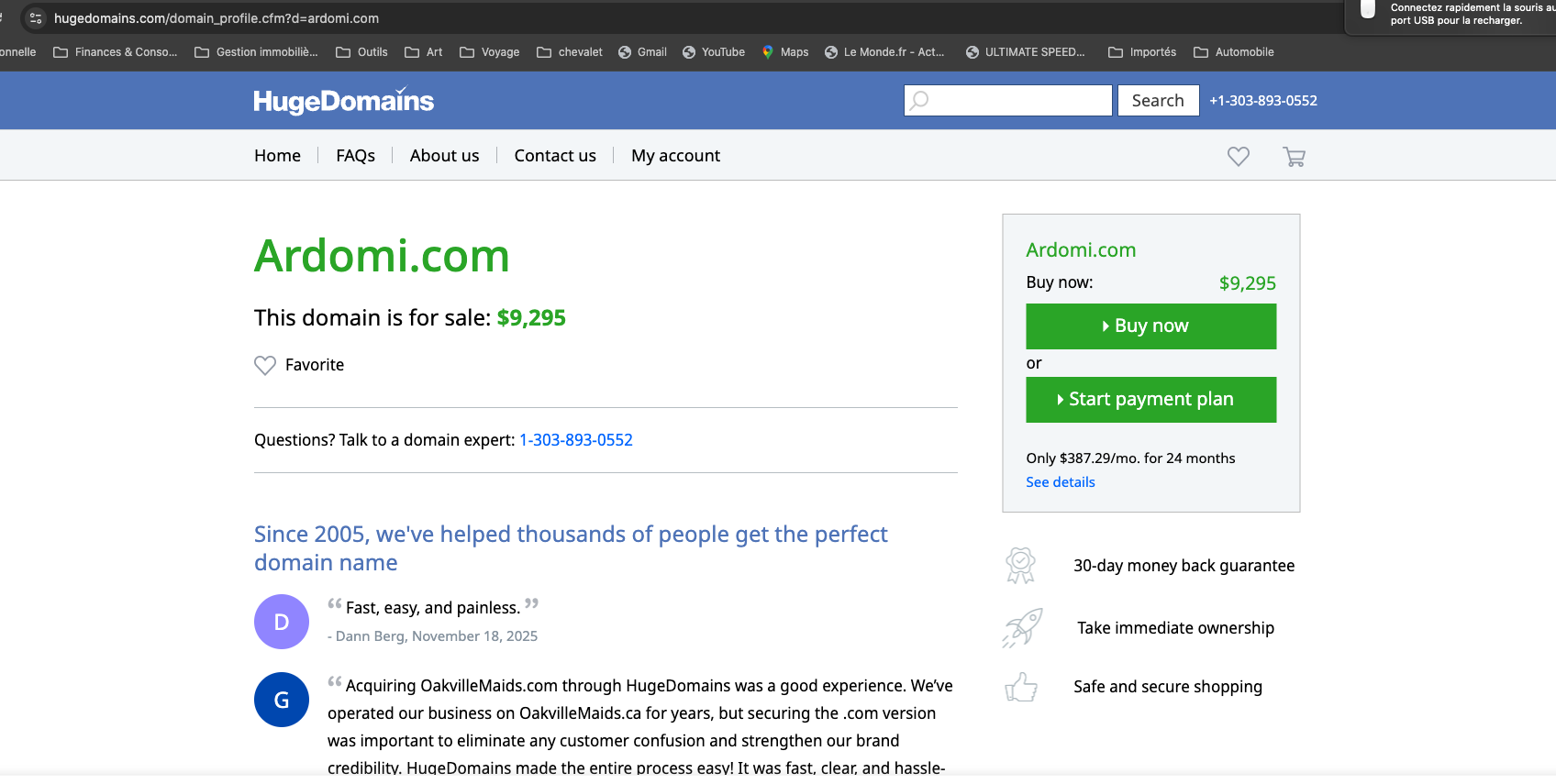
 Votre site web est artdomi.com ARTDOMI - les résultats que vous affichez proviennent d'ARDOMI (sans T) Concernant les bots qui apparaissent probablement dans la connexion, connectez votre domaine à Cloudflare et ajoutez-y des règles.
 -
 everclearliving changed their profile photo
 -
Pourquoi les noms de domaine sont-ils incorrects ? Le vôtre est artdomi.com et les résultats qui s’affichent sont ardomi.com. je ne comprends pas...
-
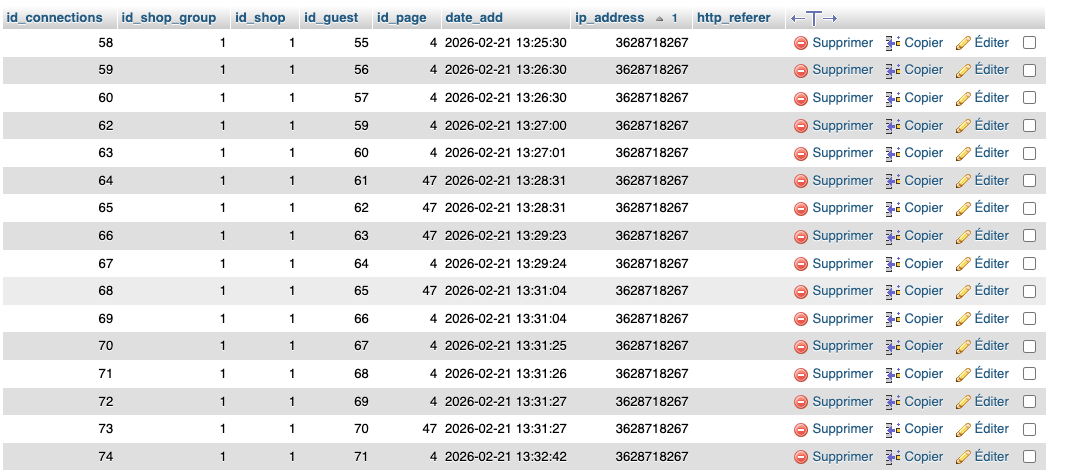
Dans la table "connections", une adresse ip revient en permanence: 3628718267. est-il possible de la bloquer?

-
 kgmostbet changed their profile photo
 -
Pourquoi les noms de domaine sont-ils incorrects ? Le vôtre est artdomi.com et les résultats qui s’affichent sont ardomi.com.
-
Bonjour, Je viens d'acheter le module, malheureusement son installation ne fonctionne pas. J'ai l'impression qu'il y a un conflit entre l'adresse technique d'OVH et l'adresse internet pour laquelle le module a été acheté.
-
 Hotel BStays changed their profile photo
 -
Réponse à ComGrafPL: (je n'ai pas trouvé le moyen de répondre personnellement en rappelant votre réponse initiale...) Mon site : https://artdomi.com J'ai suivi les instructions pour implanter le fichier cleaner.php, mais quand je teste: https://www.ardomi.com/cleaner.php, j'obtiens ceci
-
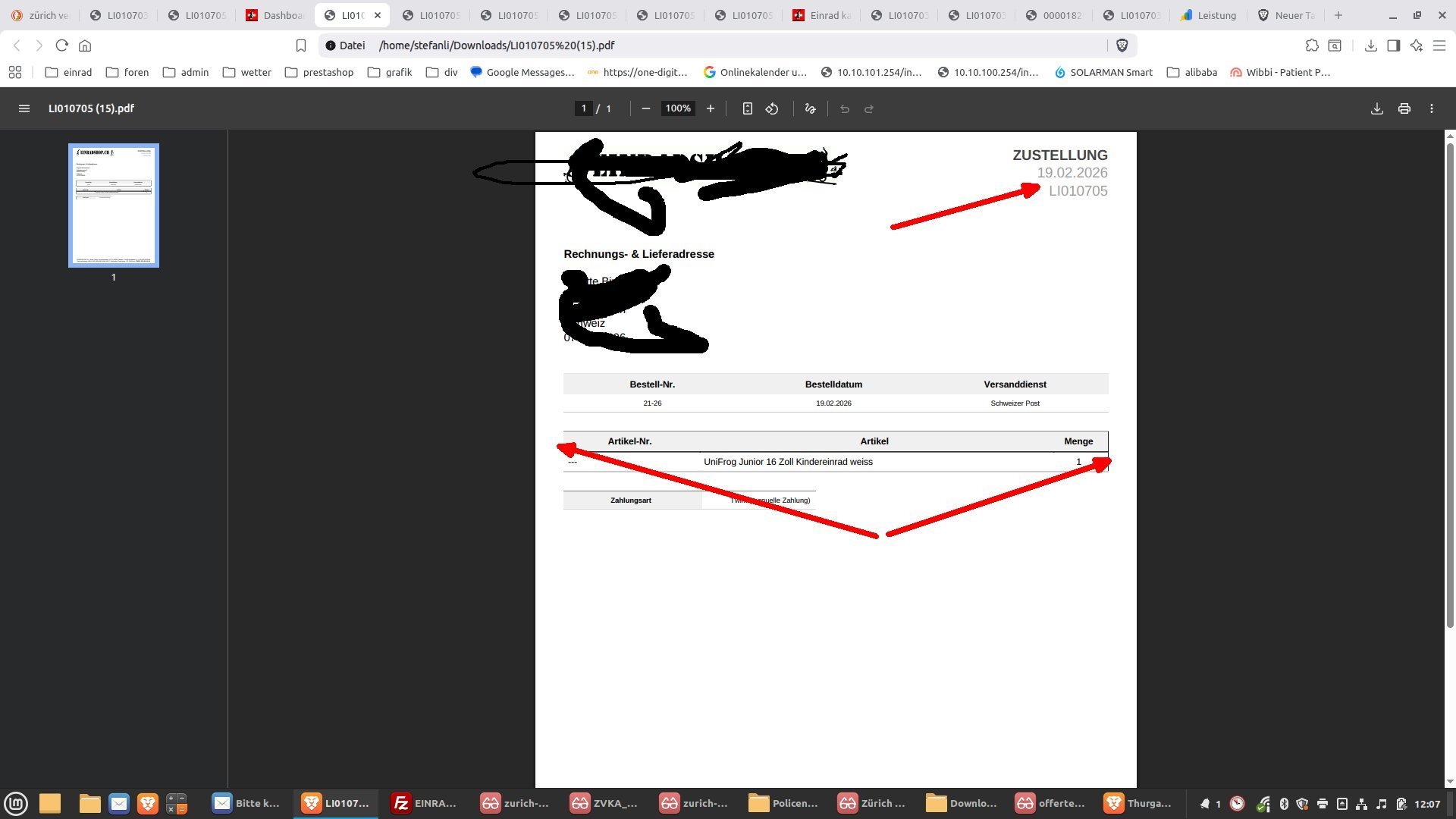
 Guten Tag Ich habe mich mal an das Thema Prestashop Lieferschein und Rechnungstemplates gewagt, da ich mein externer PDF Invoice Generator ausschalten möchte, weil er sich mit einem anderen Programm nicht verträgt (overwriting). Nun, einige Dinge konnte ich schon ändern. Wo es bei mir harzt: 1. Header oben Rechts beim Lieferschein. Ich möchte da die Rechnungsnummer einsetzen. Rechnung und Lieferschein benutzen ja die gleiche Datei header.tpl. Dort ist nichts zu finden. Wo genau wird diese Lieferscheinnummer definiert ? Ich möchte LI 10705 durch die Bestellnr. ersetzen oder ganz weglassen. Ich habe alle .tpl Dateien durchforstet und nichts gefunden. Bin da echt ratlos wo das definiert wird ? Das Wort Zustellung kann ich bestimmt in den PDF übersetzungen ändern. Das ist kein Ding. Etwas weiteres nervt: Die Tabellenränder. Auf dem Screenshot zu sehen: Bei der Produktauflistung hat es recht einen Tabellenrand und links ist er offen. Warum und wieso ist mir nicht klar. War von Beginn weg so. Darstellungsproblem ? Danke für Eure Tipps Viele Grüsse Stefan
-
 Beautique Fragrances changed their profile photo
 -
 Archangel Insurance changed their profile photo
 -
To zależy czy masz szablon classic czy jakiś customowy? Zrób sobie inspekcję.
-
 Hi guys, I am also skeptical about Thirtybees future. But, I have a live shop running on this platform, so I need a solution as well Havouza15, can you please share your experience? According to my understanding, you can try to do it by yourself or buy a migration service from experts. What is your strategy? Thanks
 - Last week
-
Bevor man im Forum einen Thread erstellt, sollte man erst einmal die Beschreibung des entsprechenden Bereichs lesen! Hier gehören Benutzerleitfäden hin, keine Fragen oder Diskussionen, da hier niemand antworten kann, die Funktion ist deaktiviert!
-

prduits associés
Graudens Lydie replied to Graudens Lydie's topic in Vente en ligne, référencement et SEO
merci pour votre réponse les produits de la même catégorie oui les produits "que vous aimerez aussi" à par 1 mot (comme par exemple chien il s'agit d'une animalerie en ligne) non donc faut il ne pas les faire apparaître -
You've only found the obvious issues so far — with PrestaShop caching there are usually many more problems hiding underneath. https://docs.litespeedtech.com/lscache/lscps/troubleshoot/ the mention that 1.7 in particular is a problem child and you should hire someone loool. PrestaShop pages are dynamic by design. The native “cache” options are not real full-page caching — they only store template fragments or database results. Because of this, external cache modules often create inconsistent behavior like stale prices, wrong stock, or sessions not updating. Historically the only somewhat reliable layer has been basic object caching (like Memcache), and even that is known to cause stale data problems because cache invalidation in PrestaShop is weak. Many older developers will remember when Varnish first became popular — a huge number of shops broke due to cached carts, wrong pricing, and session conflicts. The same risks still exist today with aggressive cache modules. In practice, the safest approach is: Use Smarty cache + CCC only Rely on PHP OPcache and proper server tuning Avoid full-page cache modules unless you deeply understand the risks Based on the troubleshooting described for this module, I would personally recommend not using it. It’s likely to create more instability than performance gain.
-

Remove invoice fron order confirmation email Presta 9
Prestashop Addict replied to ptityop's topic in General topics
Invoice options : Disable "Enable invoice"
-
prduits associés
Prestashop Addict replied to Graudens Lydie's topic in Vente en ligne, référencement et SEO
Bonjour, dans la mesure où les produits on des mots clefs se rapportant au produit principal, non au contraire. -
Bouton radio fiche produit hors déclinaison
Mediacom87 replied to Seb_56's topic in Discussion générale
Pk ne pas utiliser de déclinaison ?