
Ray UK
-
Posts
649 -
Joined
-
Last visited
-
Days Won
1
1 Follower

Recent Profile Visitors
8,995,486 profile views



.thumb.png.526a69f71c0d1580d392541fac3e6430.png)


Ray UK's Achievements






-
8.2.1 to 9 Upgrade is a nightmare
Ray UK replied to NemesisNG's topic in Upgrading PrestaShop from a previous version
Do a clean 9 install and copy the data by using this excellent free program. -
After updating my test site to 9.0.3 the back office isnt available.
-
After trial and error I found this native PS module breaks the BO ps_apiresources I had to do this via the database: load up php my admin go ps _module change value of ps_apiresources from 1 to 0 then rename, or delete, the VAR folder in your prestashop root so it recreates the BO
-
It seems I'm not the only one with the problem. I just went to report it on GitHub, but somebody beat me to it https://github.com/PrestaShop/PrestaShop/issues/40695
-
My PS 9.0.2 was downloaded via https://prestashop.com/prestashop-offers/classic/#download Then updated via the module
-
it was via the native update module
-
After updating my test site to 9.0.3 the back office isnt available. It just forwards to the front office. I have already tried deleting the var folder, which it recreated, and also renamed the .htaccess. Ive tried disabling the friendly urls in the database, which takes effect on the front but the back office still doesnt work. Any ideas? Thanks
-
To enable the dark mode there is a lot of CSS to edit in the main theme.css It would be much simpler if the main theme used the CSS variables that bootstrap provides. Also, most modules that you install, the creators like to write their own css so they also need editing. Currently, in just the hummingbird theme there are: 264 colors 68 background colors 162 font sizes 123 margins 218 margin-bottoms .... and a lot more repeated values Probably all of these could be set using variables, but for some reason they are all hard coded values. If all developers stuck to using the bootstrap variables where possible, then it would make like so much easier. I have added the dark mode to the site in my signature. Visit it on a mobile and switch to dark mode using your phone to see it work.
-
ps_facetedsearch was the module that ate my database. Without the cache enabled the db was <50MB, after enabling cache it jumps up to >3Gb in no time. Ive left my ps_facetedsearch cache disabled for this very reason.
-
Facing "temporarily unavailable" issue on Backoffice
Ray UK replied to d2o's topic in General topics
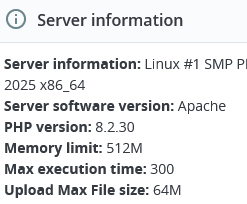
Prestashop works higher than 8.1 This is my install on 8.2.30
-
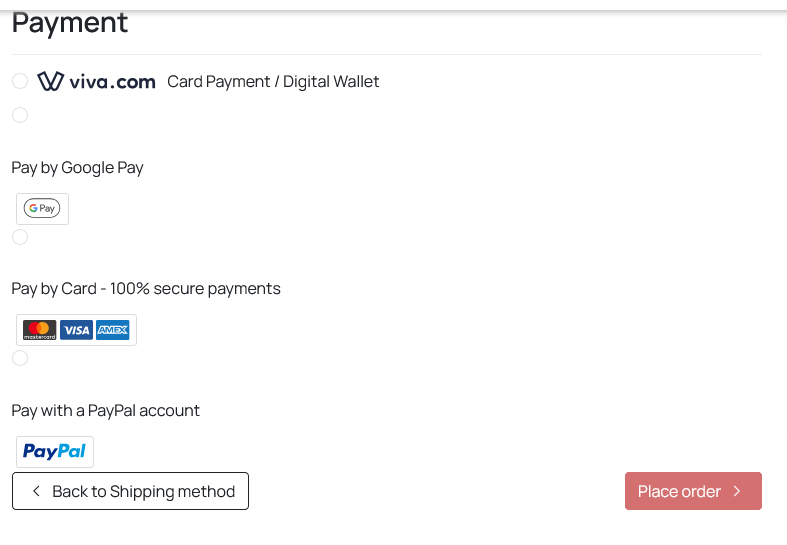
Ive just re-installed this because I had to remove due to a bad bug. After installing this one, its working, but there is some error in the css file "payments.css" This is how it looks So you need to add this css to your custom.css /* CHECKOUT PROCESS */ .ps_checkout-payment-option label { display: flex !important; } then it looks like this If you share your url then maybe a little bit of css changes will resolve your issue.
-
Exactly the same happened to me, same file. If deleting that file doesnt work then you may need to find the older version of ps_checkout and re-install that. I moved the ps_checkout module from the modules dir via ftp and the site will return.
-
So previously, I'm sure there was a button "reset defaults" in the theme section of the B.O, and now I cant find it. So after making a change in theme.yml, without selecting another theme and switching back, how can we tell PS to look for changes in theme.yml (I've also looked and don't see a shop.json in the theme directory)
-
After updating to the latest ps_checkout the following error is shown, and the whole site went down. Invalid resource provided: "/home/********/public_html/modules/ps_checkout/translations/en-US/ModulesCheckoutPscheckout.en-US.xlf"; Errors: [ERROR 1871] Element '{urn:oasis:names:tc:xliff:document:1.2}source': This element is not expected. Expected is one of ( {urn:oasis:names:tc:xliff:document:1.2}seg-source, {urn:oasis:names:tc:xliff:document:1.2}target, {urn:oasis:names:tc:xliff:document:1.2}context-group, {urn:oasis:names:tc:xliff:document:1.2}count-group, {urn:oasis:names:tc:xliff:document:1.2}note, {urn:oasis:names:tc:xliff:document:1.2}alt-trans, ##other{urn:oasis:names:tc:xliff:document:1.2}* ). (in /home//********//public_html/[admin-dir]/ - line 812, column 0) To get the site back I can remove the ps_checkout module from the modules directory, but I put the module back and the site goes down again. 😕
-
The module isnt showing in Module updates, but shows when loading marketplace and says "improvements & bug fixes". It fails to update itself. It needs bugs fixing to install the update to fix more bugs lol 😏