.png.022b5452a8f28f552bc9430097a16da2.png)

Leaderboard




Popular Content
Showing content with the highest reputation since 02/03/2026 in Posts
-
La version 1.6.2.43 est sortie Inutile de télécharger l'archive, Paramètres avancés => 1-clickupgrade et la mise à jour se fait en direct. #################################### # v1.6.2.43 - (2026-02-09) #################################### - BO: Réduction automatique du menu principal en page produit (désactivable) - Possibilité de programmer la mise en ligne / hors ligne d'un produit - Possibilité de désactiver les catégories par boutique - Ajout du statut natif de retour "Annulé/Non-reçu" - Nouvelle option pour les règles panier: Un produit acheté = un produit offert - Option pour afficher les listes de combinaisons, quantités et prix spécifiques avec pagination en page produit (BO) - Ajout des champs "Poids net" et "Pays d'origine" pour les produits - Possibilité d'ajouter/supprimer/éditer des envois multiples sur une commande - Ajout d'un contrôle optionnel de la durée de vie des mots de passe clients - Mise à jour des regex de traductions BO pour les modules utilisant des " dans les tpl/pdf - Ajout d'un contrôle optionnel de vérification de l'existence des adresses email - Ajout du contrôle des dimensions (taille et ratio) des images produits existantes - Mise à jour du module Mailalerts (contrôle de la validité de l'adresse email) - Mise à disposition du module cawl (Crédit Agricole / Worldline) - Non-affichage des combinaisons inexistantes en page produit (thème par défaut) - Correctif dans loyalty.js pour les prix supérieurs à 1 000,00 - Contrôle de la dispo des produits offerts (avec des règles paniers) pour les produits déjà présents dans les paniers clients - Prise en compte de l'ID shop pour les caches css/js (plusieurs domaines sur un même thème) - Intégration complète du format webp pour toutes les images coeur (produits, catégories, cms, fournisseurs, magasins...) - Ajout des langues dans la gestion des alias de recherche - Possibilité de ne pas afficher/demander les titres de civilité aux clients (M., Mme, etc.) - Ajout de la condition "Endommagé" (Damaged) pour les produits - Optimisation des requêtes SQL pour les listings en BO (prise en compte de la dépréciation MySQL 8 https://dev.mysql.com/worklog/task/?id=12615) - Ajout des balises Hreflang, noindex et nofollow en natif - Possibilité de charger et d'utiliser le format svg pour le logo du site - Possibilité d'éditer la catégorie "Accueil" des pages CMS - Ajout de 2 hooks pour permettre aux modules d'ajouter des choix dans la sélection des colonnes des listings BO - Ajout d'une route (modifiable) pour les documents joints - Possibilité de désactiver la page de contact - Possibilité d'envoyer la facture proforma par mail depuis la page commande - Continuation de la refactorisation et nettoyage du code2 points
-
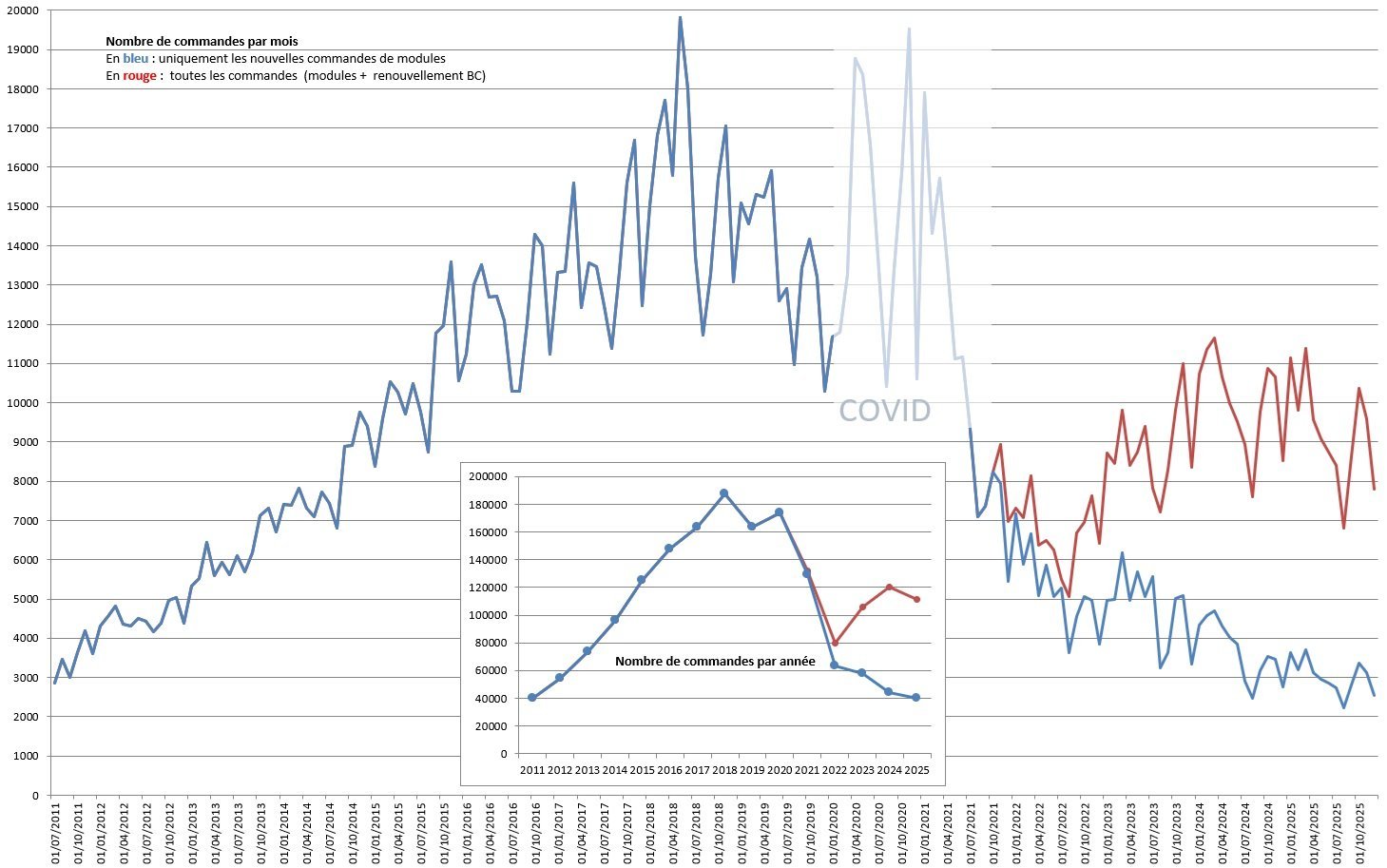
Cela ne peut pas être pire que l'équipe actuelle ; les ventes de modules sont en chute libre depuis quelques années et Shopify est plus recherché que PrestaShop sur Google : https://trends.google.fr/explore?q=Shopify%20%2C%2Fm%2F04n5bch&date=all&geo=FR Nombre de commandes par mois depuis 2011 (en petits caractères au milieu : nombre de commandes par an) En bleu : uniquement les nouvelles commandes. En rouge : toutes les commandes (nouvelles commandes + service client).
 2 points
 -
U-block is your friend2 points
-
I just recheck your code and in my opinion it can do a lot of damage in existing store if it already use override in Cart.php file, also if someone uninstall your module all overrides from Cart.php are removed, even those from other modules.2 points
-
Prestashop's native merger is very fragile. If another module has already installed a complex or poorly formatted override, parser might fail, causing the module installation to crash or the site to break2 points
-
Il faut surveiller ou tester les url pour savoir comment réagit le site.1 point
-
là on est sur une attaque. Normalement c'est au WAF de votre hébergeur de gérer ce genre de cas et les bloquer.1 point
-
Bonjour, vous faites juste face à un problème connu à savoir un défaut développement sur le module de navigation à facette natif de PrestaShop qui provoque la création de millions de liens sur votre boutique et donc de smillions de liens appelés par des robots honnêtes ou non. La seule solution, changer de module de navigation à facette, mon préféré, AmazzingFilter mais j'en liste d'autre dans mon article : https://www.mediacom87.fr/googlebot-deviendrait-il-fou/1 point
-
Thanks for letting me know. Everything I do is for my own store and I just want to share. I have in mind that if something works for me doesn’t mean it will work for everyone. I will try to recode it and make it better.1 point
-
ben oui, vous avez raison, pourquoi l'auteur n'est pas capable de le faire au lieu d'obliger tous les lecteurs qui ne sont pas anglophones de le faire à sa place à chaque lecture.1 point
-
c'est refusé.1 point
-
Oui — dans PrestaShop, il faut s’appuyer sur les dimensions d’images générées via Paramètres des images, et non sur du CSS personnalisé. PrestaShop génère déjà les attributs width et height sur les balises <img> en fonction du type d’image (home_default, large_default, etc.), ce qui correspond exactement à ce que PageSpeed attend. Si PageSpeed continue de signaler un problème, cela signifie généralement que : Un thème ou un module de performance supprime ces attributs L’image est utilisée comme image de fond CSS (hero / bannière / slider) Une surcharge de template est obsolète et ne sort plus {$image.bySize.*.width} et height Ajouter uniquement des dimensions via le CSS ne corrigera pas l’audit : les attributs doivent être présents dans le HTML ou bien l’espace de mise en page doit être réservé à l’aide de aspect-ratio.1 point
-
HI, if your post need feedback from other developers best place to add it is https://www.prestashop.com/forums/forum/9-addons-modules-and-themes-developers/ Forum is not an advertising hub, only active members can put their offers on forum is specific forum sections. You need to have at least 100 active posts on forum to do that. Be aware that using AI to generate posts or bumping topics only for increase posts number on forum is not welcome.1 point
-
hello \src\PrestaShopBundle\Controller\Admin\Sell\Order OrderController /** @var FoundProduct[] $foundProducts */ $foundProducts = $this->getQueryBus()->handle(new SearchProducts($searchPhrase, 10💥, $currencyIsoCode, $orderId)); return $this->json([ 'products' => $foundProducts, ]); } catch (ProductSearchEmptyPhraseException $e) { return $this->json( ['message' => $this->getErrorMessageForException($e, $this->getErrorMessages($e))], Response::HTTP_BAD_REQUEST ); } catch (Exception $e) { return $this->json( ['message' => $this->getErrorMessageForException($e, [])], Response::HTTP_INTERNAL_SERVER_ERROR ); } } That's the limit.1 point
-
Thank you very much for your reply. I think I just needed to put a => in the link instead of just =, but I will use your structure. As for modifying the code by force, you're right that it would be much better to use overrides and hooks, but at the moment it's something I don't fully understand and I wouldn't even know where to start.1 point
-
private function formatCategory($rawCategory, $idsOfCategoriesInPath): array { $children = []; if (!empty($rawCategory['children'])) { foreach ($rawCategory['children'] as $k => $v) { $children[$k] = $this->formatCategory($v, $idsOfCategoriesInPath); } } $categoryLink = ''; if ($rawCategory['id_category'] == 12) { $categoryLink = 'https://www.motorola.com'; } elseif ($rawCategory['id_category'] == 13) { $categoryLink = 'https://www.nokia.com'; } elseif ($rawCategory['id_category'] == 14) { $categoryLink = 'https://www.samsung.com'; } else { $categoryLink = $this->context->link->getCategoryLink($rawCategory['id_category'], $rawCategory['link_rewrite']); } return [ 'id' => $rawCategory['id_category'], 'link' => $categoryLink, 'name' => $rawCategory['name'], 'desc' => $rawCategory['description'], 'children' => $children, 'in_path' => in_array($rawCategory['id_category'], $idsOfCategoriesInPath), ]; } It would definitely be a good idea to create an override and add your own hook to the functions. Then create a small module that would return your own URL via the hook.1 point
-
If anyone ever will come here to find a solution: I've made really simple module: https://github.com/kn00pers/Prestashop-Exclude-shipping-price-module1 point
-
Pour info: Il y a un souci chez Colissimo depuis hier soir pour récupérer la liste des points relais pour les adresses situées dans les grandes villes (avec arrondissements). L'affichage des points relais pour les autres adresses fonctionnent. Le problème a été remonté à Colissimo. Update 16h45: le problème semble résolu à présent.1 point
-
Hi, I took a quick look at your page, and I need to point out a critical UX issue that might be driving away customers, especially from the younger demographic. First off – great job on the visual side, shop looks nice. The Problem: Scroll Hijacking The site uses a script that overrides the browser's native scrolling behavior (often called "smooth scroll"). Instead of reacting instantly to the finger or mouse wheel, the page "floats" with a noticeable delay. Why this hurts you (Gen Z / Millennial perspective): Loss of Control: As a user accustomed to fast-paced content consumption (Instagram/TikTok standards), I scan pages rapidly. This artificial delay makes the site feel sluggish, laggy, or even broken. Frustration = Bounce: The brain perceives this delay as friction. Instead of scrolling down to "Add to Cart," I feel like I'm fighting the interface. In e-commerce, any resistance leads to a higher bounce rate. Best regards,1 point
-
https://www.twenteeoneprints.com/ If you can give me some feedback on my website.1 point
-
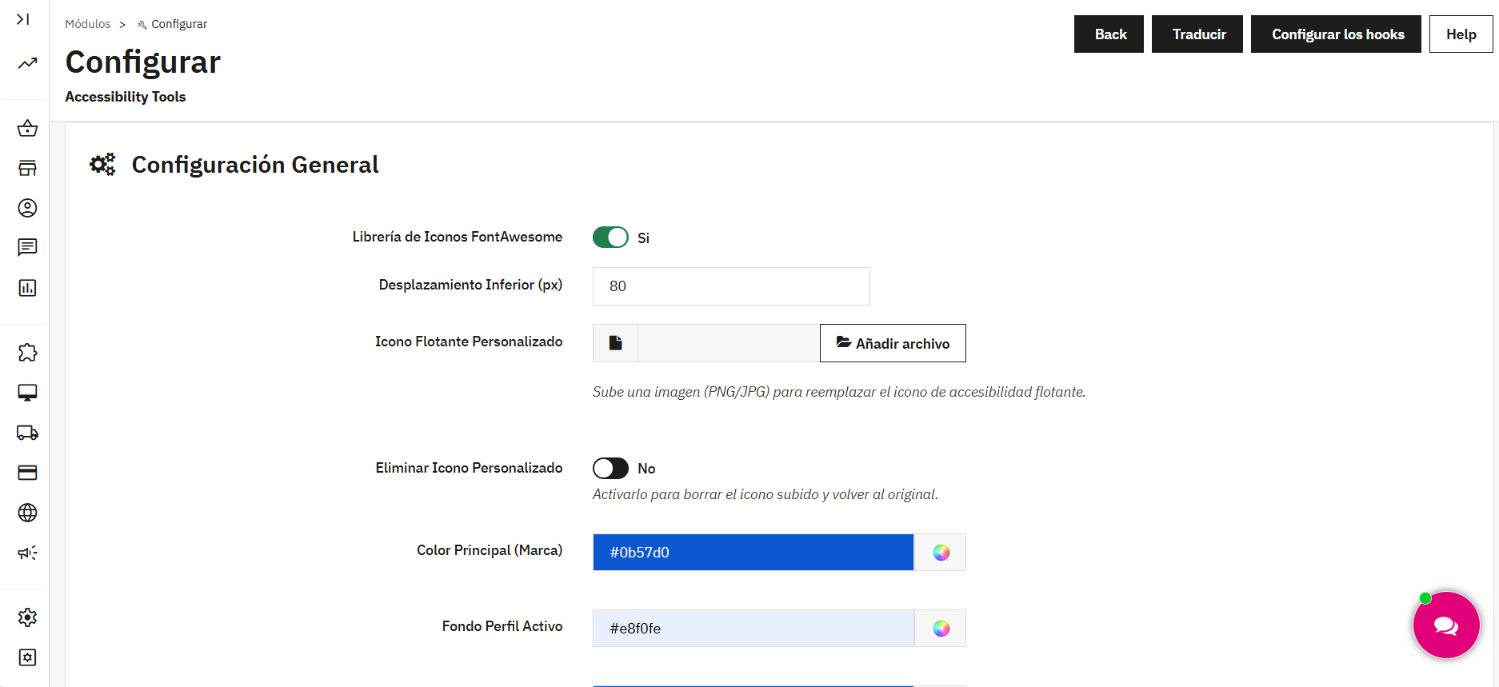
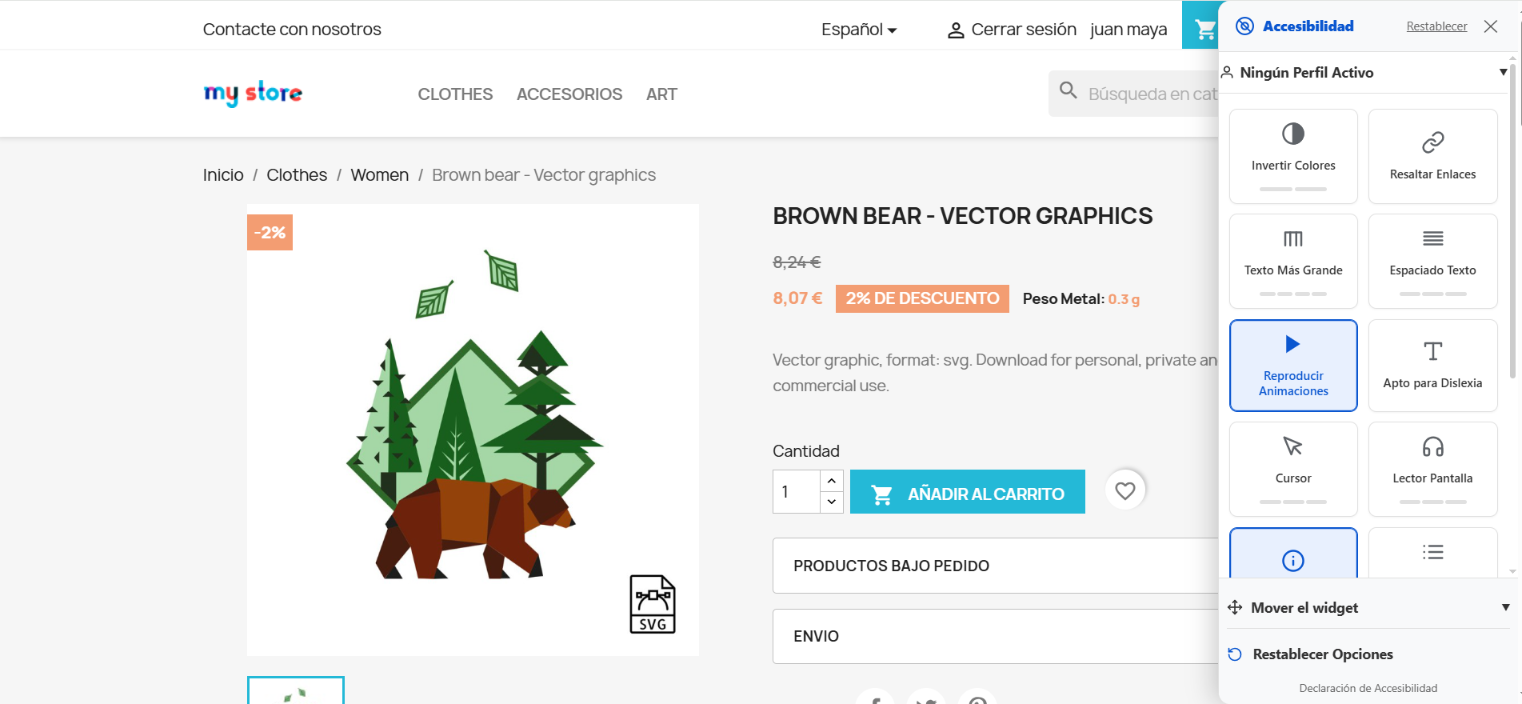
Hello community! I’m excited to introduce Accessibility Total Pro, a module designed to transform any PrestaShop store into an inclusive space, making navigation easier for people with visual, motor, or cognitive disabilities. With new web accessibility regulations (such as the European Accessibility Act), this module doesn't just improve your customer experience—it helps your business meet essential legal standards. Key Features: Disability Profiles: Pre-configured settings for Colorblindness, Dyslexia, ADHD, Blindness, Low Vision, Motor Impairment, and Epilepsy. Visual Personalization: Users can adjust text size, spacing, contrast, and saturation in real-time. Reading Tools: Includes screen reader support, reading mask, and link highlighting. Animation Control: Ability to pause moving elements, which is vital for users with photosensitive epilepsy. Fully Customizable for Admins: Change widget colors to match your brand, upload your custom icon, and manage your accessibility statement directly from the backoffice. Why choose this module? Boosts SEO (Search engines prioritize accessible websites). Increases conversion rates by removing barriers to checkout. Demo / Purchase: Accessibility Total Pro I look forward to your feedback!
1 point
-
Pour le moment, je recommande la version 8.2.3 comme optimale pour une boutique en ligne. La version 9 présente actuellement trop de bugs ; elle fonctionnera peut-être mieux à l'avenir pour les nouvelles boutiques ayant bénéficié de nombreuses mises à jour. Pour une boutique en ligne, les versions 1.6 et 1.7 sont les plus adaptées.1 point
-
It seems I'm not the only one with the problem. I just went to report it on GitHub, but somebody beat me to it https://github.com/PrestaShop/PrestaShop/issues/406951 point
-
Bonjour, voici une piste https://github.com/PrestaShop/PrestaShop/issues/406881 point
-
Buenas, por motivos de cambio de trabajo y otras circunstancias personales vendo mi tienda online. Tiene 10 años de antiguedad y en su nicho es líder de ventas a nivel nacional. Consta de una base de datos de 20.000 clientes y su facturación es creciente cada mes. La dedicación como dueño que le dedico no sube de 20 horas semanales y tiene un beneficio neto en el actual año de 60.000 euros. Interesados por favor hablenme por privado. Gracias1 point
-
Oui c’est ce que j'ai expliqué, rien ne peut empêcher de faire une simple capture d'écran ou autre solution.1 point
-
PrestaShop does not support customer-entered pricing natively, but this can be implemented properly via a dedicated module (not a core hack). I have the expertise to build this feature so customers can enter an amount, have it validated, and proceed through checkout safely with correct totals, taxes, and reporting. Beyond the feature itself, my agency specializes in full migrations from non-PrestaShop platforms to PrestaShop. This includes preserving existing workflows, data integrity, and SEO while rebuilding the shop to fully leverage PrestaShop’s strengths rather than fighting against them. If you’d like, I’m happy to provide a free, detailed migration and new-shop build plan tailored to your current platform and requirements. Just message me with your email address. Migrations into PrestaShop are something we’ve always excelled at—we enjoy the challenge, go the extra mile, and focus on building a clean, scalable, and well-architected shop from day one.1 point
-
Hello, We've got the same problem after switching old version to 8.2.3. We're searching for hours on the forum.fr without any luck. Next time we shall begin directly on the .en 🙂 Thank you for the tip, it works and save our day.1 point
-
Sì, il campo “UBICAZIONEMAGAZZINO” è quello giusto. Inserisci lì scaffale e ripiano per ogni variante, usando un formato chiaro e coerente per trovare facilmente i prodotti.1 point
-
Il existe un mensonge evident sur ces ressources allouées dans les plans illimités ogfert par o2switch, et ce depuis de très nombreuses années, bien avant leur reprise... Nous le savons formellement par le retour de clients venus chez nous, même avec un plan euro2 chez nous, avec 2 ou 3 coeurs, ca marchait bien mieux !... On offre 30 jours satisfait ou remboursé... Donc, chacun avec son budget et ses besoins doit chercher et tester avec du concret, car ce qui convient a certains ne convient pas a d'autres, car 1 coup c'est le prix, l'autre coup la performance. La grande et vraie question est donc combien chacun est pret a payer pour quelle performance vérifiée face au besoin reel du site ? (Sachant qu'il existe beaucoup de variable système pure derrière les ressources allouées et affichées sur le site de l'hebergeur..., ce qui ne donne donc pas la meme performance theorique entre 2 hébergeurs avec 2 plans hébergement en apparence identique)1 point
-
Salut à Tous, Nous avons appliqué de légères hausses ces dernières années pour suivre l'augmentation de nos coûts, mais jamais du +130%, c'est spectaculaire effectivement. TWS nous a approché récemment, ils sont effectivement à la recherche de tout ce qui bouge, mais les discussions se sont arrêtées comme ils ont senti que nous ne sommes plutôt pas vendeur à la ristourne de notre petite affaire, et que notre prix de cession serait très élevée vu notre taille. YOORshop est petit, mais stable, et l'impératif absolu n'est pas financier mais clairement celui de la normalité et performance globale du service, donc, non du profit à outrance.1 point
-
@rachel01 try this free solution1 point
-
It seems to work for mee after I did an additional change to the changes suggested above in LInk.php class . The additional change I did was in ovveride Tools function switchLanguage: from: if ( ($iso = Tools::getValue('isolang')) && Validate::isLanguageIsoCode($iso) && ($id_lang = (int) Language::getIdByIso($iso)) ) { $_GET['id_lang'] = $id_lang; } to if ( ($iso = Tools::getValue('isolang')) && Validate::isLanguageIsoCode($iso) && ($id_lang = (int) Language::getIdByIso($iso)) ) { $_GET['id_lang'] = $id_lang; } else { $_GET['id_lang'] = (int) Configuration::get('PS_LANG_DEFAULT'); } basically adding the else block to handle when there is no isolang posted: else { $_GET['id_lang'] = (int) Configuration::get('PS_LANG_DEFAULT'); } I hope that helps the community.1 point
-
Ok ça fonctionne après moultes recherches j'ai juste désactivé la gestion des stocks merci quand même !1 point
-
Comme son nom l'indique le groupe défaut est le groupe de tous les clients lors de leur inscription, mais malheureusement aussi lorsqu'ils ne sont pas inscrits. J'entends par là que lors du calcul du tarif c'est le groupe defaut qui est utilisé même si le client n'est pas authentifié. Pour avoir un tarif différent et remisé il va falloir créer un autre groupe et ajouter un tarif spécifique pour ce groupe, et faire en sorte que tout nouveau client enregistré soit automatiquement. Ce n'est pas un gros oeuvre mais ça demande un petit développement de module. Il faut souscrire au hook correspondant à une création de compte (actionCustomerAccountAdd par ex) et un bout de code ajoute le membre au groupe remisé. Votre approche était bonne cela dit , mais le fait est qu'un utilisateur non authentifié/enregistré appartien au groupe defaut ce qui lui confère les droits aux réductions dudit groupe...1 point
-
Bon, j'ai vérifié mon hébergement... et le WAF n'était pas activé par défaut . Je viens de l'activer sur tous les domaines et sous-domaines.0 points
-
Wenn nur technisch notwendige Cookies benutzt werden, ist kein Einwilligungs-Banner erforderlich und auch nicht zu empfehlen wegen des hohen Nervfaktors.0 points





(1)(1)(1)(1).thumb.jpg.94a8ebf86510e5c6f06fe8b7af0d0289.jpg)

.png.fbf35be4120c1ed96be58d1619ff00fa.png)
.png.8be6f84ee1a464937ca49b957bd9c593.png)
.png.942c887a3c587d850dc708c45e8a3d7f.png)