.png.022b5452a8f28f552bc9430097a16da2.png)


jasoninatx
-
Posts
42 -
Joined
-
Last visited
jasoninatx's Achievements

-
 That did it. You were correct. Thanks, man.
 -
Ok, I've found it. I have 3 groups and and they are all enabled. They all show "yes" for show prices. Good idea to look there, but that isn't where the problem is.
-
Yeah, product quantities are gone too. Where do I go to change the option for disable / enable prices?
-
Here is my shop's url. You can see all the product, but no prices and there's not even a shopping cart to buy something from. http://www.theherbbar.com/shop/?live_configurator_token=3f3933d9df1f2f9c968ff2800bf8609b&id_employee=1&id_shop=1&theme=theme6
-
Yes, every product lost it's price tag on the front office. They all show up on the back office, but one day all the prices, on every product, as well as the shopping cart has disappeared from my front office whether I'm logged in or not.
-
Hi, I checked preferences, products and catalog mode is enabled. So, I'm still at a loss. Thanks though.
-
I'm sure it's something that I've inadvertently done, but my shopping cart and the prices on all the products have disappeared from my front office. I have uninstalled, reinstalled and reset my cart block module without success.
-
Hey Vekia, during the time I posted this error on the forum, I also emailed our webmaster. This is his reply which fixed this issue. My hosting company notified me on the 16th about a upgrade of PHP from v5.3 to v5.4 in the July to September time frame. Evidently this happened to your site on July 22nd judging by the error log. I have rolled PHP back to v5.3 for your site. I am now able to access the site without error. You should check with your e-commerce vendor and enquire when they will update their product to be compatible with v5.4. And then when you update that software let me know so I can bump you back up to 5.4.
-
Thanks, El Patron.
-
Hi, I went out of town for a few days and my site was fine when I left. I get back in town and try to go to my back office and get the below error message. I haven't touched a thing. This happens on multiple browsers and computers even after clearing my cache/history. Any ideas? Internal Server ErrorThe server encountered an internal error or misconfiguration and was unable to complete your request. Please contact the server administrator, [email protected] and inform them of the time the error occurred, and anything you might have done that may have caused the error. More information about this error may be available in the server error log. Additionally, a 404 Not Found error was encountered while trying to use an ErrorDocument to handle the request.
-
Will do, thank you again. Please let me know how you fixed it.
-
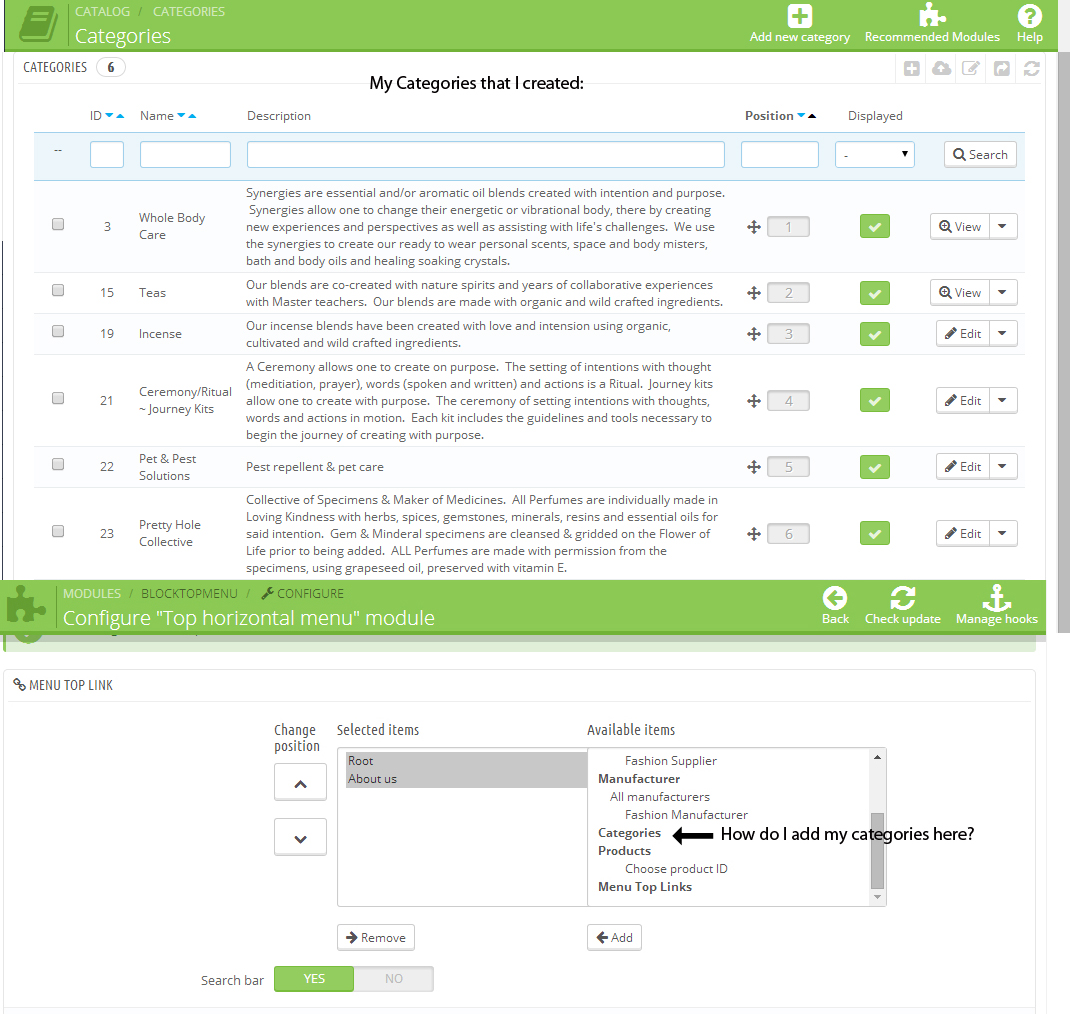
Done. I could be going about this all wrong. I'm basically wanting my categories to show up in the top menu bar. One of them was there at one time and I accidentally removed it. Not sure how. So, I'm trying to get them back up and this is my guess as to how I put them back up there.
-
Hi, It won't allow me to click on it. I can't click on any of the items listed in bold.
-
Please see screen shot. It is 2 screen shots combined in one image. First it shows all my categories, that I created, and then it shows the "Top horizontal menu" module where the Categories section is empty. How do I get my categories in there to show up on the top horizontal menu? Thanks.

-
Please look at my attached screenshot.
jasoninatx replied to jasoninatx's topic in Configuring and using PrestaShop
Thanks, Paul. Please see the attached screenshot in regards to this. Aren't these my child categories? These are what I'm wanting to show up.