
Jump to content

Edit History

Andrei H

Andrei H

Hello, 

These are the necessary changes:

In themes/classic/templates/catalog/_partials/product-details.tpl:

Remove {if $product.description} and the corresponding {/if}. Keep the li element that was inside it.

Remove the 'Product Details' li element

Move the product_details block below the the product_description one

This is how it should look in the end:

{block name='product_tabs'}
    <div class="tabs" style="margin-bottom: 40px;">
      <ul class="nav nav-tabs" role="tablist">
        <li class="nav-item">
            <a
              class="nav-link active js-product-nav-active"
              data-toggle="tab"
              href="#description"
              role="tab"
              aria-controls="description"
              aria-selected="true">{l s='Description' d='Shop.Theme.Catalog'}</a>
        </li>
        {if $product.attachments}
          <li class="nav-item">
            <a
              class="nav-link"
              data-toggle="tab"
              href="#attachments"
              role="tab"
              aria-controls="attachments">{l s='Attachments' d='Shop.Theme.Catalog'}</a>
          </li>
        {/if}
        {foreach from=$product.extraContent item=extra key=extraKey}
          <li class="nav-item">
            <a
              class="nav-link"
              data-toggle="tab"
              href="#extra-{$extraKey}"
              role="tab"
              aria-controls="extra-{$extraKey}">{$extra.title}</a>
          </li>
        {/foreach}
      </ul>

      <div class="tab-content" id="tab-content">
        <div class="tab-pane fade in active js-product-tab-active" id="description" role="tabpanel">
          {block name='product_description'}
            <div class="product-description">{$product.description nofilter}</div>
          {/block}

        {block name='product_details'}
          {include file='catalog/_partials/product-details.tpl'}
        {/block}
        </div>

        {block name='product_attachments'}
          {if $product.attachments}
          <div class="tab-pane fade in" id="attachments" role="tabpanel">
              <section class="product-attachments">
                <p class="h5 text-uppercase">{l s='Download' d='Shop.Theme.Actions'}</p>
                {foreach from=$product.attachments item=attachment}
                  <div class="attachment">
                    <h4><a href="{url entity='attachment' params=['id_attachment' => $attachment.id_attachment]}">{$attachment.name}</a></h4>
                    <p>{$attachment.description}</p>
                    <a href="{url entity='attachment' params=['id_attachment' => $attachment.id_attachment]}">
                      {l s='Download' d='Shop.Theme.Actions'} ({$attachment.file_size_formatted})
                    </a>
                  </div>
                {/foreach}
              </section>
            </div>
          {/if}
        {/block}

        {foreach from=$product.extraContent item=extra key=extraKey}
        <div class="tab-pane fade in {$extra.attr.class}" id="extra-{$extraKey}" role="tabpanel" {foreach $extra.attr as $key => $val} {$key}="{$val}"{/foreach}>
          {$extra.content nofilter}
        </div>
        {/foreach}
    </div>
  </div>
{/block}

Then, in themes/classic/templates/catalog/_partials/product-details.tpl, replace 

<div class="js-product-details tab-pane fade{if !$product.description} in active{/if}"

with

<div class="js-product-details tab-pane fade in active"

Check the attached screenshot to see how the result should look like
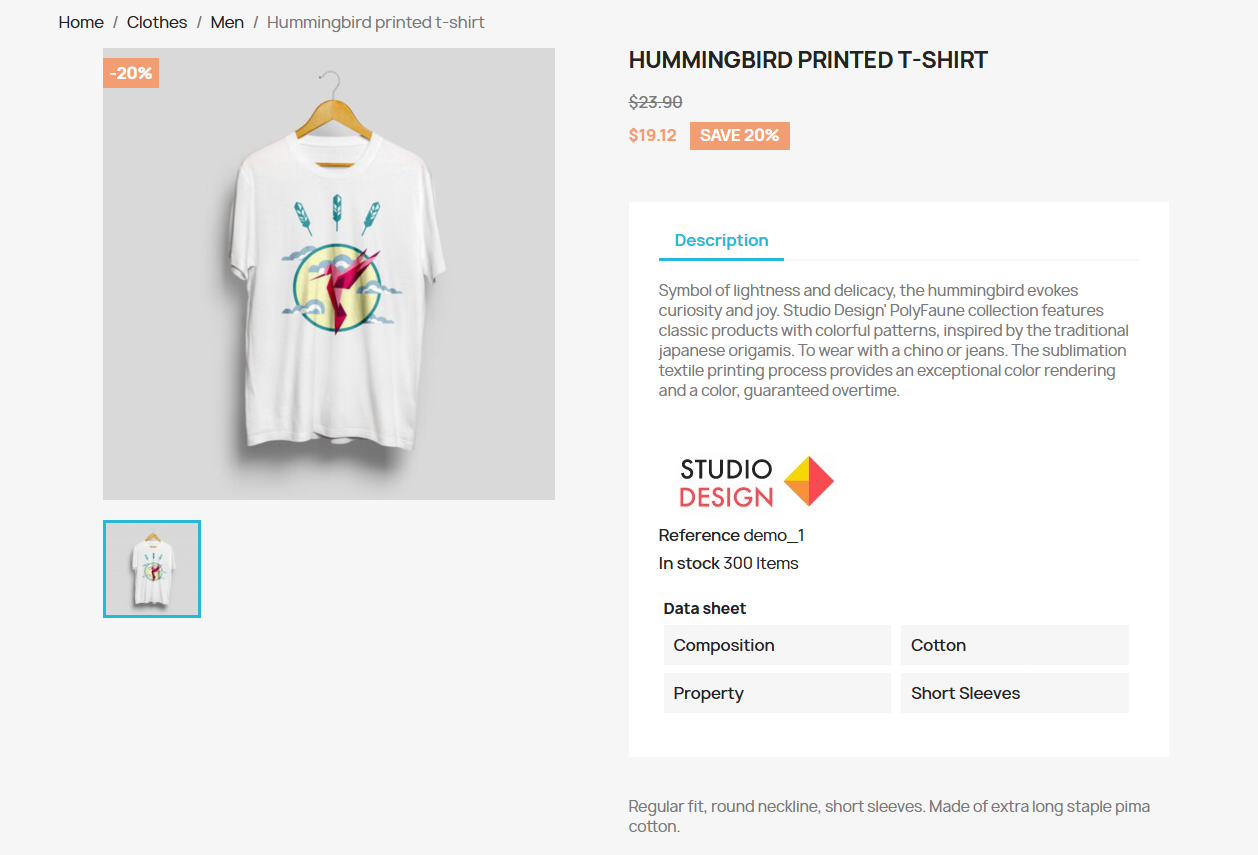
Screenshot 2026-01-08 195703.png

Andrei H

Andrei H

Hello, 

These are the necessary changes:

In themes/classic/templates/catalog/_partials/product-details.tpl:

Remove {if $product.description} and the corresponding {/if}. Keep the li element that was inside it.

Remove the 'Product Details' li element

Move the product_details block below the the product_description one

This is how it should look in the end:

{block name='product_tabs'}
  <div class="tabs">
    <ul class="nav nav-tabs" role="tablist">
      <li class="nav-item">
          <a
            class="nav-link{if $product.description} active js-product-nav-active{/if}"
            data-toggle="tab"
            href="#description"
            role="tab"
            aria-controls="description"
            {if $product.description} aria-selected="true"{/if}>{l s='Description' d='Shop.Theme.Catalog'}</a>
      </li>
      {if $product.attachments}
        <li class="nav-item">
          <a
            class="nav-link"
            data-toggle="tab"
            href="#attachments"
            role="tab"
            aria-controls="attachments">{l s='Attachments' d='Shop.Theme.Catalog'}</a>
        </li>
      {/if}
      {foreach from=$product.extraContent item=extra key=extraKey}
        <li class="nav-item">
          <a
            class="nav-link"
            data-toggle="tab"
            href="#extra-{$extraKey}"
            role="tab"
            aria-controls="extra-{$extraKey}">{$extra.title}</a>
        </li>
      {/foreach}
    </ul>

    <div class="tab-content" id="tab-content">
     <div class="tab-pane fade in{if $product.description} active js-product-tab-active{/if}" id="description" role="tabpanel">
       {block name='product_description'}
         <div class="product-description">{$product.description nofilter}</div>
       {/block}

      {block name='product_details'}
        {include file='catalog/_partials/product-details.tpl'}
      {/block}
     </div>

     {block name='product_attachments'}
       {if $product.attachments}
        <div class="tab-pane fade in" id="attachments" role="tabpanel">
           <section class="product-attachments">
             <p class="h5 text-uppercase">{l s='Download' d='Shop.Theme.Actions'}</p>
             {foreach from=$product.attachments item=attachment}
               <div class="attachment">
                 <h4><a href="{url entity='attachment' params=['id_attachment' => $attachment.id_attachment]}">{$attachment.name}</a></h4>
                 <p>{$attachment.description}</p>
                 <a href="{url entity='attachment' params=['id_attachment' => $attachment.id_attachment]}">
                   {l s='Download' d='Shop.Theme.Actions'} ({$attachment.file_size_formatted})
                 </a>
               </div>
             {/foreach}
           </section>
         </div>
       {/if}
     {/block}

     {foreach from=$product.extraContent item=extra key=extraKey}
     <div class="tab-pane fade in {$extra.attr.class}" id="extra-{$extraKey}" role="tabpanel" {foreach $extra.attr as $key => $val} {$key}="{$val}"{/foreach}>
       {$extra.content nofilter}
     </div>
     {/foreach}
  </div>
</div>
{/block}

Then, in themes/classic/templates/catalog/_partials/product-details.tpl, replace 

<div class="js-product-details tab-pane fade{if !$product.description} in active{/if}"

with

<div class="js-product-details tab-pane fade in active"

Check the attached screenshot to see how the result should look like

Screenshot 2026-01-08 195703.png

Andrei H

Andrei H

Hello, 

These are the necessary changes

In themes/classic/templates/catalog/_partials/product-details.tpl:

Remove {if $product.description} and the corresponding {/if}. Keep the li element inside it.

Remove the 'Product Details' li

Move the product_details block below the the product_description

This is how it should look in the end:

{block name='product_tabs'}
  <div class="tabs">
    <ul class="nav nav-tabs" role="tablist">
      <li class="nav-item">
          <a
            class="nav-link{if $product.description} active js-product-nav-active{/if}"
            data-toggle="tab"
            href="#description"
            role="tab"
            aria-controls="description"
            {if $product.description} aria-selected="true"{/if}>{l s='Description' d='Shop.Theme.Catalog'}</a>
      </li>
      {if $product.attachments}
        <li class="nav-item">
          <a
            class="nav-link"
            data-toggle="tab"
            href="#attachments"
            role="tab"
            aria-controls="attachments">{l s='Attachments' d='Shop.Theme.Catalog'}</a>
        </li>
      {/if}
      {foreach from=$product.extraContent item=extra key=extraKey}
        <li class="nav-item">
          <a
            class="nav-link"
            data-toggle="tab"
            href="#extra-{$extraKey}"
            role="tab"
            aria-controls="extra-{$extraKey}">{$extra.title}</a>
        </li>
      {/foreach}
    </ul>

    <div class="tab-content" id="tab-content">
     <div class="tab-pane fade in{if $product.description} active js-product-tab-active{/if}" id="description" role="tabpanel">
       {block name='product_description'}
         <div class="product-description">{$product.description nofilter}</div>
       {/block}

      {block name='product_details'}
        {include file='catalog/_partials/product-details.tpl'}
      {/block}
     </div>

     {block name='product_attachments'}
       {if $product.attachments}
        <div class="tab-pane fade in" id="attachments" role="tabpanel">
           <section class="product-attachments">
             <p class="h5 text-uppercase">{l s='Download' d='Shop.Theme.Actions'}</p>
             {foreach from=$product.attachments item=attachment}
               <div class="attachment">
                 <h4><a href="{url entity='attachment' params=['id_attachment' => $attachment.id_attachment]}">{$attachment.name}</a></h4>
                 <p>{$attachment.description}</p>
                 <a href="{url entity='attachment' params=['id_attachment' => $attachment.id_attachment]}">
                   {l s='Download' d='Shop.Theme.Actions'} ({$attachment.file_size_formatted})
                 </a>
               </div>
             {/foreach}
           </section>
         </div>
       {/if}
     {/block}

     {foreach from=$product.extraContent item=extra key=extraKey}
     <div class="tab-pane fade in {$extra.attr.class}" id="extra-{$extraKey}" role="tabpanel" {foreach $extra.attr as $key => $val} {$key}="{$val}"{/foreach}>
       {$extra.content nofilter}
     </div>
     {/foreach}
  </div>
</div>
{/block}

Then, in themes/classic/templates/catalog/_partials/product-details.tpl, replace 

<div class="js-product-details tab-pane fade{if !$product.description} in active{/if}"

with

<div class="js-product-details tab-pane fade in active"

Check the attached screenshot to see how the result should look like

Screenshot 2026-01-08 195703.png

×
×
  • Create New...